

Difference between revisions of "Main Page"
From Dynomotion
| Line 1: | Line 1: | ||
=='''Dynomotion wiki '''<span style="color: #999999;">(started 10/12/2015)'''<br />'''</span>== | =='''Dynomotion wiki '''<span style="color: #999999;">(started 10/12/2015)'''<br />'''</span>== | ||
| − | Welcome to our wiki where you can find and share knowledge on Dynomotion's systems. To begin adding information to this wiki, simply create an account and start editing. To make editing pages easier for everyone, we have installed a [https://help.bluespice.com/index.php/VisualEditor visual editor] by default. This visual editor allows you to edit a wiki page much like you would a standard word processing document. Standard [https://www.mediawiki.org/wiki/Help:Editing MediaWiki editing] may also be used or set as the default in your User Preferences. | + | Welcome to our wiki where you can find and share knowledge on Dynomotion's systems. To begin adding information to this wiki, simply create an account and start editing. To make editing pages easier for everyone, we have installed a [https://help.bluespice.com/index.php/VisualEditor visual editor] by default. This visual editor allows you to edit a wiki page much like you would a standard word processing document. Standard [https://www.mediawiki.org/wiki/Help:Editing MediaWiki editing] may also be used or set as the default in your User Preferences. |
''Warning: Use at your own risk. Information is for example purposes only and may contain errors. It is up to the User to verify the information is correct and is safe to use. In no cases will any contributor or Dynomotion be liable for incorrect information.'' | ''Warning: Use at your own risk. Information is for example purposes only and may contain errors. It is up to the User to verify the information is correct and is safe to use. In no cases will any contributor or Dynomotion be liable for incorrect information.'' | ||
| Line 9: | Line 9: | ||
==Creating New Wiki Pages== | ==Creating New Wiki Pages== | ||
| − | To create a new wiki page (after registering for an account) you first want to create a link from the main page where your page best fits. To do this, click 'edit' on the on the main page. With Visual Editor enabled (by default) place the cursor on a new line in the section from which you want to link. Then click the "insert/edit link" button in the visual editor menu. | + | To create a new wiki page (after registering for an account) you first want to create a link from the main page where your page best fits. To do this, click 'edit' on the on the main page. With Visual Editor enabled (by default) place the cursor on a new line in the section from which you want to link. Then click the "insert/edit link" [[File:insert_link.gif|none|link=]]button in the visual editor menu. Then insert a descriptive title and description which will be the linked text on the page. |
| + | |||
| + | [[File:InsertLinkPopUp.gif|none|link=]] | ||
| + | |||
| + | Then save the page and click on the link you just created and start editing! | ||
| + | |||
| + | [[Insert Page Test|Test Page]] | ||
==Installation== | ==Installation== | ||
Revision as of 18:50, 15 October 2015
Contents
Dynomotion wiki (started 10/12/2015)
Welcome to our wiki where you can find and share knowledge on Dynomotion's systems. To begin adding information to this wiki, simply create an account and start editing. To make editing pages easier for everyone, we have installed a visual editor by default. This visual editor allows you to edit a wiki page much like you would a standard word processing document. Standard MediaWiki editing may also be used or set as the default in your User Preferences.
Warning: Use at your own risk. Information is for example purposes only and may contain errors. It is up to the User to verify the information is correct and is safe to use. In no cases will any contributor or Dynomotion be liable for incorrect information.
Thanks for Contributing!
Creating New Wiki Pages
To create a new wiki page (after registering for an account) you first want to create a link from the main page where your page best fits. To do this, click 'edit' on the on the main page. With Visual Editor enabled (by default) place the cursor on a new line in the section from which you want to link. Then click the "insert/edit link"
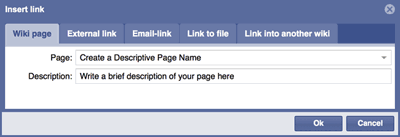
Then save the page and click on the link you just created and start editing!
Installation
First Download and install our PC Software. This includes a USB Driver directory with the Windows Hardware Driver for KFLOP. Whenever prompted to find drivers for KFLOP you should navigate to this directory. If KFLOP has already been connected it is likely to be shown in the Window's Device Manager as an Unknown Device with a Yellow indication. In this case right click and select "Update Driver" and follow the prompts to direct windows to the USB Driver folder.
Note in Windows 7 64-bit, W8, W8.1, W10 Windows must be re-booted with driver signing enforcement disabled in order to install the drivers.
Board Info
KFLOP Hardware Info
KStep Hardware Info
Kanalog Hardware Info
SnapAmp Hardware Info
Konnect Hardware Info
Software Test Releases
PC Example Applications
A number of PC Applications using the KMotion Libraries are available in the Software download. Visual Studio should be used to modify/compile the applications. Currently the projects are compatible with VS 2008 Standard but later Versions can upgrade the projects and can be used including the free Microsoft Version of VS 2013 Community. In some cases MFC capability needs to be added as a separate download.
The Install Root directory contains a VS Solution BuildAllLibs.sln to build the KMotion Libraries.
The VS Solution \PC VC Examples\BuildExamples.sln will build most all of the Examples
MFC C++ Examples - \PC VC Examples
- KMotionCNC - CNC Application for controlling Mill/Router/Lathe etc
- Download Waveform - simple example to download some data to the gather buffer
- SimpleCoffload - simple example to compile/download a C Program to KFLOP
- SimpleConsole - simple example to send Console Script commands to KFLOP
- SimpleCoordMotion - simple example of creating coordinated motion paths in KFLOP
- SimpleGCode - simple example to execute a GCode File
C# Examples - \PC VC Examples
- KFlopWebNC - HTML CNC based App interfacing to KMotion Libraries
- KMotion_dotNet Console - Windows Console App using .NET Library Interface
- MeasureFiducials - Video Alignment Application to measure fiducial alignment marks and map coordinte space
- SimpleFormsCS - Simple Windows C# Forms App includes USB speed test
- TeachMotion - App for use with Lathe Spinners to teach Spinning motion and create GCode
Visual Basic Examples \PC VB Examples
- DynoMotion VB.net - Demonstrates Coordinated motion, GCode Execution, Status, etc...
- Jogger - Simple VB6 App to Jog Axes
- Jogger.NET - simple VB .NET App to Jog Axes
KFLOP C Programs
C Programs provide a powerful and flexible capability to perform almost any sequence of operations within KFLOP. In most cases after you have tested and tuned all your hardware using the KMotion.exe setup program all the settings and initialization steps required for your system can be placed into an Initialization C Program so that your system can be fully initialized simply by executing the Initialization program. Using a C Program offers full flexibility to initialize your system however and in whatever order you wish. In most common cases an existing example can be used with simple modification of values specific to your system. The KMotion.exe Setup program has some automatic capability to translate the Axes Screen Values that were determined by you during configuration and testing into C Code.
The Initialization C Program will normally perform operations of the following type:
- Enable/define any Option boards present (ie. KStepPresent=TRUE; // enable KSTEP input multiplexing)
- The setting of Axes parameters (ie. ch0->Accel=200000; )
- Enable Axes (ie.EnableAxisDest(0,0); )
- Define the Coordinated Motion Axes (ie. DefineCoordSystem(0,1,2,-1); // define axes for XYZ
- Forever Loop to service any continuous requirements such as MPG, External Buttons, EStop, etc
Adding the configuration for a new Axis to your Initialization C Program:
- Configure the Channel in KMotion.exe and verify that after Pushing "Enable" (which downloads and enables) it all works properly
- On the Config/Flash Screen Push the "C Code To Clip Board" Button
- Open your Initialization Program in the C Programs Screen
- Position the cursor after the previous Axis settings
- Right Mouse Click "Paste"
- If desired also enable the axis by inserting EnableAxisDest(xx,0); where xx is the Axis number
- Save the file
- Test after a power cycle if the C Program initializes all Axes Properly
C Programming References
See the links listed here.
Simplest C Program
It is important to understand that any KFLOP C Program consists of a minimum number of parts as shown below.
The first part is an #include statement which includes a definition file that defines all the functionality available in KFLOP. The KMotionDef.h file is included with every installation to define all the functions, variables, structures, and defines available in that Version. It is located in the DSP_KFLOP subdirectory of the installation. Open it with the KMotion.exe C Programs Screen to see what's available.
The next part is the "main" function. This is where execution of the program will actually begin.
The last part is the code that is to be executed and belongs to the main function. Curly brackets { } define the beginning and end of the function. This example contains only one print statement to be executed. Note how the code within the curly brackets is indented (using a tab or spaces) to show that it belongs to the main function block. This indentation is not required but helps readers see the program structure. Instructions must end with a semicolon ';'. Double forward slashes allow comments to be added at the end of an instruction.
include "KMotionDef.h"
main()
{
printf("Hello World!\n"); // send message to console
}
Basic Disk Read/Write
KFLOP has no file system on its own, but when connected to a PC with a PC App running it can do basic Disk Read or Write Operation. Read capability was recently added in Version 4.33q. There isn't any PC Keyboard access (getchar()). See the KmotionDef.h file for supported functions:
// Note: standard C language printf
int printf(const char *format, ...); // Print formatted string to console
int sprintf(char *s, const char *format, ...); // Print formatted string to string
typedef int FILE;
FILE *fopen(const char*, const char*); // Open a text file for writing on the PC (2nd param = "rt" or "wt")
int fprintf(FILE *f, const char * format, ...); // Print formatted string to the PC's Disk File
int fclose(FILE *f); // Close the disk file on the PC
int Print(char *s); // Print a string to the console window
int PrintFloat(char *Format, double v); // Print a double using printf format, ex "%8.3f\n"
int PrintInt(char *Format, int v); // Print an integer using printf format, ex "result=%4d\n"
int sscanf(const char *_str, const char *_fmt, ...); //scan string and convert to values
#define MAX_READ_DISK_LENGTH 1024 // max allowed length of disk file line length
extern volatile int read_disk_buffer_status; //status of read disk buffer 1=line available, 2=error, 3=eof
extern char read_disk_buffer[MAX_READ_DISK_LENGTH+1];
char *fgets(char *str, int n, FILE *file); //read string from PC disk file, str=buffer, n=buffer length, f=FILE pointer, returns NULL on error
int fscanf(FILE *f, const char *format, ...); //read sting from PC Disk file, convert values, returns number of items converted
int feof(FILE *f); // End of file status for disk reading
Simple DiskReadWrite.c example
include "KMotionDef.h"
main()
{
FILE *f;
char s[256];
double a=123.456,b=999.999,c=0.001;
double x=0,y=0,z=0;
int result;
// write 3 comma separated values to a disk file
f=fopen("c:\\Temp\\KFlopData.txt","wt");
fprintf(s,"%f,%f,%f\n",a,b,c);
fclose(f);
// read them back in
f=fopen("c:\\Temp\\KFlopData.txt","rt");
if (!f)
{
printf("Unable to open file\n");
return;
}
// read a line and convert 3 doubles
result=fscanf(f,"%lf,%lf,%lf",&x,&y,&z);
fclose(f);
printf("# values converted = %d, x=%f, y=%f, z=%f\n",result,x,y,z);
}
Wiring Diagrams
Basic Kanalog DAC and Encoder Connections 3 Axis
Basic Kanalog DAC and Encoder Connections 3 Axis #2
KFLOP+SnapAmp DC Brush Motors with MPG
KFLOP JP5 Open Collector Step/Dir Connections to Power Step PSD5042-2P Drives
Applications and Projects
In this section you can link pages that show your application or project. Useful pages would be "How-To's" that show others how to do the same project you did.

