

Difference between revisions of "Help:New Page Creation"
From Dynomotion
| Line 1: | Line 1: | ||
| − | + | ===Creating a New Wiki Page=== | |
| + | Creating a new page is simple: | ||
| + | |||
| + | # Create an account | ||
| + | # Click 'edit' on the on the main page and scroll to the line where you want to insert a link to your page | ||
| + | # With Visual Editor enabled (by default) either right-click and choose "insert/edit link" or click on the "insert/edit link" in the visual editor menu bar. | ||
| + | # Then insert a descriptive page title in the Page field and allow enough time for the field to complete searching. Once the field has completed searching for pages of the same title, add a brief description which will become the linked text on the page. | ||
[[File:insert_link.gif|none|link=]] | [[File:insert_link.gif|none|link=]] | ||
| Line 9: | Line 15: | ||
[[File:EmptyPageLink.gif|none|border|link=]] | [[File:EmptyPageLink.gif|none|border|link=]] | ||
| − | + | ===If the pop-up fails=== | |
If there are issues with this method of inserting a link, there is another method that is a bit more manual. Click to edit the page and place the cursor on the line where you want the link to appear. Then insert a link by typing <nowiki>[[</nowiki> followed by the page name then followed by <nowiki>]]</nowiki>. If you want the page name to be different than the link text you can separate the link by typing | between the link and the text. Se examples below: | If there are issues with this method of inserting a link, there is another method that is a bit more manual. Click to edit the page and place the cursor on the line where you want the link to appear. Then insert a link by typing <nowiki>[[</nowiki> followed by the page name then followed by <nowiki>]]</nowiki>. If you want the page name to be different than the link text you can separate the link by typing | between the link and the text. Se examples below: | ||
Revision as of 00:00, 19 October 2015
Creating a New Wiki Page
Creating a new page is simple:
- Create an account
- Click 'edit' on the on the main page and scroll to the line where you want to insert a link to your page
- With Visual Editor enabled (by default) either right-click and choose "insert/edit link" or click on the "insert/edit link" in the visual editor menu bar.
- Then insert a descriptive page title in the Page field and allow enough time for the field to complete searching. Once the field has completed searching for pages of the same title, add a brief description which will become the linked text on the page.

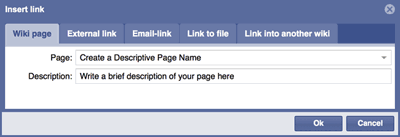
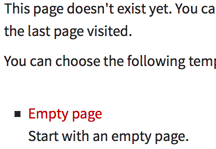
Click "Ok", then save the page and click on the link you just created, ignore the advice to click the back button and instead click on the "Empty Page" link as shown below and start editing!
If the pop-up fails
If there are issues with this method of inserting a link, there is another method that is a bit more manual. Click to edit the page and place the cursor on the line where you want the link to appear. Then insert a link by typing [[ followed by the page name then followed by ]]. If you want the page name to be different than the link text you can separate the link by typing | between the link and the text. Se examples below:
Example: [[insert page name | insert linked text]]
Example: [[Wiring Single Ended Encoders | Information on how to wire single-ended encoders]]
Then save the page and click on the link you just created, ignore the advice to click the back button and instead click on the "Empty Page" link as shown above and start editing!
Tips for creating pages:
- Choose a descriptive page name and link text: Not "My Machine", but rather "Three Axis Milling Machine Retrofit"
- Create pages in an organized manner: Describe what the page is about, create clear sections that flow

