Tool Setup Screen - User Buttons
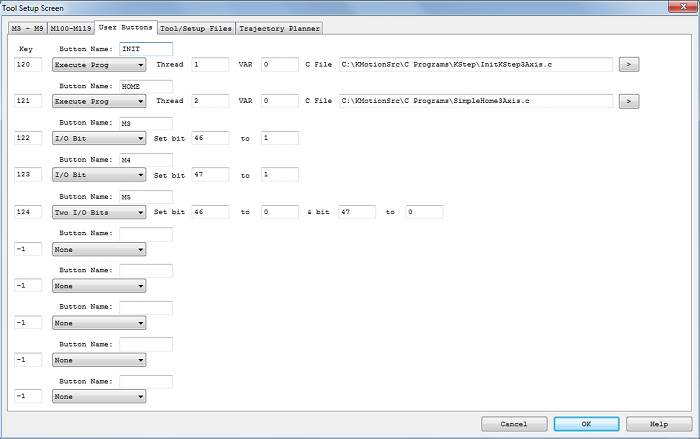
(Click on image to jump to related help)
The Tool Setup Screen allows KMotionCNC to be configured for a particular machine tool. Each machine tool is likely to have different motion resolution, speeds, and acceleration limits. It is also likely to different I/O requirements with regard to Spindle control and such. Additionally a machine may have different initialization and homing requirements. KMotionCNC has a flexible mechanism for defining what type of action is to be performed for various M Codes and Custom Buttons.
Custom Buttons

Custom Button Actions function in exactly the same manner as the G Code Actions described on the M3-M9 Tab with the only difference being that they are invoked by the User pushing a button rather than by a command encountered within a G Code Program. There is an additional Parameter above the Action Type which is the Title to be placed on the Custom Button. The example above shows buttons defined with titles "INIT", "HOME", and "M3". Up to 10 buttons may be defined. Common uses for the Buttons are to invoke programs that initialize and/or home the machine. Any Button with an empty title field will cause the button to be hidden on the main KMotionCNC screen. See here for how these defined buttons will appear in the main KMotionCNC Screen.
A Hot Key can also be assigned so that pushing that specific Key will triger the Action as if the button was clicked with the mouse. The Screen must have focus for the Hot Key to work. See below for a list of numeric Virtual Key Codes:
Key Codes
| Value | Description |
|---|---|
| 1 | Left mouse button |
| 2 | Right mouse button |
| 3 | CANCEL key |
| 4 | Middle mouse button |
| 8 | BACKSPACE key |
| 9 | TAB key |
| 12 | CLEAR key |
| 13 | ENTER key |
| 16 | SHIFT key |
| 17 | CTRL key |
| 18 | MENU key |
| 19 | PAUSE key |
| 20 | CAPS LOCK key |
| 27 | ESC key |
| 32 | SPACEBAR key |
| 33 | PAGE UP key |
| 34 | PAGE DOWN key |
| 35 | END key |
| 36 | HOME key |
| 37 | LEFT ARROW key |
| 38 | UP ARROW key |
| 39 | RIGHT ARROW key |
| 40 | DOWN ARROW key |
| 41 | SELECT key |
| 42 | PRINT SCREEN key |
| 43 | EXECUTE key |
| 44 | SNAPSHOT key |
| 45 | INS key |
| 46 | DEL key |
| 47 | HELP key |
| 144 | NUM LOCK key |
KeyA Through KeyZ Are the Same as Their ASCII Equivalents: 'A' Through 'Z'
| Value | Description |
|---|---|
| 65 | A key |
| 66 | B key |
| 67 | C key |
| 68 | D key |
| 69 | E key |
| 70 | F key |
| 71 | G key |
| 72 | H key |
| 73 | I key |
| 74 | J key |
| 75 | K key |
| 76 | L key |
| 77 | M key |
| 78 | N key |
| 79 | O key |
| 80 | P key |
| 81 | Q key |
| 82 | R key |
| 83 | S key |
| 84 | T key |
| 85 | U key |
| 86 | V key |
| 87 | W key |
| 88 | X key |
| 89 | Y key |
| 90 | Z key |
Key0 Through Key9 Are the Same as Their ASCII Equivalents: '0' Through '9
| Value | Description |
|---|---|
| 48 | 0 key |
| 49 | 1 key |
| 50 | 2 key |
| 51 | 3 key |
| 52 | 4 key |
| 53 | 5 key |
| 54 | 6 key |
| 55 | 7 key |
| 56 | 8 key |
| 57 | 9 key |
Keys on the Numeric Keypad
| Value | Description |
|---|---|
| 96 | 0 key |
| 97 | 1 key |
| 98 | 2 key |
| 99 | 3 key |
| 100 | 4 key |
| 101 | 5 key |
| 102 | 6 key |
| 103 | 7 key |
| 104 | 8 key |
| 105 | 9 key |
| 106 | MULTIPLICATION SIGN (*) key |
| 107 | PLUS SIGN (+) key |
| 108 | ENTER (keypad) key |
| 109 | MINUS SIGN (-) key |
| 110 | DECIMAL POINT(.) key |
| 111 | DIVISION SIGN (/) key |
Function Keys
| Value | Description |
|---|---|
| 112 | F1 key |
| 113 | F2 key |
| 114 | F3 key |
| 115 | F4 key |
| 116 | F5 key |
| 117 | F6 key |
| 118 | F7 key |
| 119 | F8 key |
| 120 | F9 key |
| 121 | F10 key |
| 122 | F11 key |
| 123 | F12 key |
| 124 | F13 key |
| 125 | F14 key |
| 126 | F15 key |
| 127 | F16 key |