

Difference between revisions of "KFLOP C Programs"
From Dynomotion
O Williams (Talk | contribs) m (→Simplest C Program) |
(Added C Brackets and Function Descriptions) |
||
| Line 39: | Line 39: | ||
The last part is the code that is to be executed and belongs to the main function. Curly brackets { } define the beginning and end of the function. This example contains only one print statement to be executed. Note how the code within the curly brackets is indented (using a tab or spaces) to show that it belongs to the main function block. This indentation is not required but helps readers see the program structure. Instructions must end with a semicolon ';'. Double forward slashes allow comments to be added at the end of an instruction. The include statement has a # symbol in front of it. | The last part is the code that is to be executed and belongs to the main function. Curly brackets { } define the beginning and end of the function. This example contains only one print statement to be executed. Note how the code within the curly brackets is indented (using a tab or spaces) to show that it belongs to the main function block. This indentation is not required but helps readers see the program structure. Instructions must end with a semicolon ';'. Double forward slashes allow comments to be added at the end of an instruction. The include statement has a # symbol in front of it. | ||
| − | include "KMotionDef.h"<br | + | <pre class="brush:c">include "KMotionDef.h" |
| + | main() | ||
| + | { | ||
| + | printf("Hello World!\n"); // send message to console | ||
| + | }</pre> | ||
| + | |||
| + | |||
| + | |||
| + | |||
| + | ===<span id="C Curly Brackets" class="mw-headline">C Curly Brackets { }<br /></span>=== | ||
| + | <span class="mw-headline">Often is is necessary to group a number of individual C instructions into a group of instructions that can then be treated as a single instruction. The name given to this is a "Block" of instructions. The beginning and end of the block are marked with Curly Brackets. Some other programming languages use the words "begin" and "end" for this purpose. C Language uses { } brackets. Here is an example of 3 instructions (2 arithmetic assignment instructions and a function call instruction) grouped into a Block:</span> | ||
| + | |||
| + | <pre class="brush:c">{ | ||
| + | X = 1 + 1; | ||
| + | Y = X + 1; | ||
| + | Move(1,100); | ||
| + | }</pre> | ||
| + | |||
| + | The begin curly bracket and end curly bracket mark the beginning and end of the block. Notice the curly brackets are on separate lines and we indent the instructions in the block by 4 spaces (or a tab) to make it easy to read, to be able to easily see where the blocks begin and end, and to easily see which end bracket matches with which beginning bracket. | ||
| + | |||
| + | This style doesn't matter to the compiler. The code written below would produce exactly the same result: | ||
| + | |||
| + | <pre class="brush:c"> {X = 1 + 1; Y = X + 1; | ||
| + | Move(1,100); | ||
| + | }</pre> | ||
| + | |||
| + | But please take the time to format your code properly to make it easier to read and help yourself avoid bugs. The Microsoft Visual Studio Editor has a nice feature to automatically format C Code. See the Edit | Advanced | Format Document option. | ||
| + | |||
| + | |||
| + | |||
| + | <span class="mw-headline"> By default most C operations (like if/else, for loops, while loops, functions, etc ) target a single instruction. Take for example an "if" statement. If the condition is true the next single instruction only will be executed and if the condition is not true then the next single instruction will be skipped. Here is an example:<br /></span> | ||
| + | |||
| + | <pre class="brush:c">if (condition) | ||
| + | X = 2; | ||
| + | Y = X + 1;</pre> | ||
| + | In this case only the X = 2 is the only instruction that is part of the "if". The Y = X + 1 instruction will always be executed. This is true regardless of how the lines are indented or formatted. | ||
| + | |||
| + | If our desire is to have both instructions to be part of the if condition then it is necessary to put the two instructions in a block like this: | ||
| + | |||
| + | <pre class="brush:c">if (condition) | ||
| + | { | ||
| + | X = 2; | ||
| + | Y = X + 1; | ||
| + | }</pre> | ||
| + | |||
| + | |||
| + | |||
| + | |||
| + | |||
| + | |||
| + | ===<span id="C Functions" class="mw-headline">C Functions (Subroutines)</span>=== | ||
| + | A C Function is a list of C instructions than can be called to execute from other places in a C Program. | ||
| + | |||
| + | <pre class="brush:c">// define function to Enable, Move, and wait with two parameters | ||
| + | void EnableMoveWait(int Axis, double dist) | ||
| + | { | ||
| + | EnableAxis(Axis); // enable the Axis | ||
| + | Move(Axis,dist); // move the Axis | ||
| + | while (!CheckDone(Axis)) ; // wait until done moving | ||
| + | }</pre> | ||
| + | |||
| + | This can be useful to simply group the instructions together as a single operation to make a program more understandable. Furthermore it can be useful if the same operations need to be performed multiple places in a program to avoid repeating all the instructions multiple times. Instead of repeating the same block of instructions multiple places the block of instructions is formed into a function with a name and then the function can be "called" from multiple places in the program. | ||
| + | |||
| + | |||
| + | A Function can also have "parameters". This is useful when the group of instructions that might occur at different places in the program are not exactly the same but only very similar. The parameters can be used to allow the caller to substitute values in the function so the same function can be used in different circumstances. The number of parameters and type of each parameter must be defined in the function. Although parameter types can be anything they are most commonly: Integers (int), Single precision floating point numbers (float), double precision floating point numbers (double), or character strings (char *). | ||
| + | |||
| + | void EnableMoveWait(<span style="color: #ff0000;">'''int Axis, double dist'''</span>) | ||
| + | |||
| + | |||
| + | A Function may have a return value. Some other programming languages (ie Basic) have Subroutines and Sub Functions that are declared in different ways. A Subroutine is a list of instructions. A Sub Function is a list of instructions that also returns a value. The C language treats both the same as Functions. If nothing needs to be returned by the function then the return type can be specified as "void". | ||
| + | |||
| + | <span style="color: #ff0000;">'''void'''</span> EnableMoveWait(int Axis, double dist) | ||
| + | |||
| + | |||
| + | If a function doesn't require any parameters the parameter list should be specified as "void". A common mistake is specify nothing for the parameter list. This is telling the compiler to accept any parameters and is usually not desirable. A function with no parameters and no return value should be specified as: | ||
| + | |||
| + | <span style="color: #ff0000;">'''void'''</span> SomeFunction(<span style="color: #ff0000;">'''void'''</span>) | ||
| + | |||
| + | |||
| + | There is a special function called "main". This is the most top level of the C Program and is the function that is first called when the C Program begins. | ||
| + | |||
| + | |||
| + | Below is a program with duplicated code. It performs the same 3 similar operations on 3 different axes to Enable, Move, and Wait an Axis. Notice the same operations are performed each time with only two differences: the Axis and the distance moved. So by using a function with two parameters we can replace the 3 instructions with a single function call. The first parameter is which Axis which is an integer value. The second parameter is the distance to move which is a double precision value. | ||
| + | |||
| + | <pre class="brush:c">include "KMotionDef.h" | ||
| + | main() | ||
| + | { | ||
| + | EnableAxis(0); // enable the Axis | ||
| + | Move(0,1000.0); // move the Axis | ||
| + | while (!CheckDone(0)) ; // wait until done moving | ||
| + | |||
| + | EnableAxis(1); // enable the Axis | ||
| + | Move(1,2000.0); // move the Axis | ||
| + | while (!CheckDone(1)) ; // wait until done moving | ||
| + | |||
| + | EnableAxis(2); // enable the Axis | ||
| + | Move(1,-3000.0); // move the Axis | ||
| + | while (!CheckDone(2)) ; // wait until done moving | ||
| + | }</pre> | ||
| + | |||
| + | Now declaring a function named EnableMoveWait with 2 parameters (and void return value) we can simplify the C Program, lessen the number of total instructions in the program, and most importantly guarantee that the exact same operations are performed for each axis. | ||
| + | |||
| + | <pre class="brush:c">include "KMotionDef.h" | ||
| + | |||
| + | // define function to Enable, Move, and wait with two parameters | ||
| + | void EnableMoveWait(int Axis, double dist) | ||
| + | { | ||
| + | EnableAxis(Axis); // enable the Axis | ||
| + | Move(Axis,dist); // move the Axis | ||
| + | while (!CheckDone(Axis)) ; // wait until done moving | ||
| + | } | ||
| + | |||
| + | main() | ||
| + | { | ||
| + | EnableMoveWait(0, 1000.0); // call function for Axis 0 | ||
| + | EnableMoveWait(1, 2000.0); // call function for Axis 1 | ||
| + | EnableMoveWait(2,-3000.0); // call function for Axis 2 | ||
| + | }</pre> | ||
| + | |||
| + | It is often desirable to place the functions toward the end of file with the main starting point of the program toward the beginning. This tends to make the program more readable and logical. This is not necessary but more a personal preference. Because the C Compiler only reads the program one time from beginning to end it is good to place at the beginning a description of any Functions that exist in the program. The allows the compiler to know the names of any functions and what parameter and return value types they have before they are used in the program. It is critical that the parameters passed in the call to the function are the exact correct number and type that are defined to be used by the function itself. So to inform the compiler of what function to expect a "function prototype" is specified. This is exactly the same as the function declaration itself except with no body of instructions. It consists of only one line followed by a semicolon to indicate it is only a prototype and not the entire function. See the Program below that has the function moved below the main function and with a function prototype at the beginning: | ||
| + | |||
| + | <pre class="brush:c">include "KMotionDef.h" | ||
| + | |||
| + | // define function prototype of function to expect later | ||
| + | void EnableMoveWait(int Axis, double dist); | ||
| + | |||
| + | main() | ||
| + | { | ||
| + | EnableMoveWait(0, 1000.0); // call function for Axis 0 | ||
| + | EnableMoveWait(1, 2000.0); // call function for Axis 1 | ||
| + | EnableMoveWait(2,-3000.0); // call function for Axis 2 | ||
| + | } | ||
| + | |||
| + | // define function to Enable, Move, and wait with two parameters | ||
| + | void EnableMoveWait(int Axis, double dist) | ||
| + | { | ||
| + | EnableAxis(Axis); // enable the Axis | ||
| + | Move(Axis,dist); // move the Axis | ||
| + | while (!CheckDone(Axis)) ; // wait until done moving | ||
| + | } | ||
| + | </pre> | ||
| + | |||
| + | Final C Program shown below with annotations | ||
| + | |||
| + | [[File:SimpleFunction.png|none|link=]] | ||
===<span id="Basic_Disk_Read.2FWrite" class="mw-headline">Basic Disk Read/Write</span>=== | ===<span id="Basic_Disk_Read.2FWrite" class="mw-headline">Basic Disk Read/Write</span>=== | ||
Revision as of 16:38, 1 November 2017
C Programs provide a powerful and flexible capability to perform almost any sequence of operations within KFLOP. In most cases after you have tested and tuned all your hardware using the KMotion.exe setup program all the settings and initialization steps required for your system can be placed into an Initialization C Program so that your system can be fully initialized simply by executing the Initialization program. Using a C Program offers full flexibility to initialize your system however and in whatever order you wish. In most common cases an existing example can be used with simple modification of values specific to your system. The KMotion.exe Setup program has some automatic capability to translate the Axes Screen Values that were determined by you during configuration and testing into C Code.
Contents
- 1 Initialization C Program
- 2 Adding the configuration for a new Axis to your Initialization C Program:
- 3 Programming References
- 4 Simplest C Program
- 5 C Curly Brackets { }
- 6 C Functions (Subroutines)
- 7 Basic Disk Read/Write
- 8 Simple DiskReadWrite.c example
- 9 Global Persist Variables
- 10 Threads and KMotion.exec C Programs Screen
- 11 C Program Size and Stack Limitations
- 12 Gather Buffer
- 13 Performing multiple Operations continually in a forever Loop
Initialization C Program
The Initialization C Program will normally perform operations of the following type:
- Enable/define any Option boards present (ie. KStepPresent=TRUE; // enable KSTEP input multiplexing)
- The setting of Axes parameters (ie. ch0->Accel=200000; )
- Enable Axes (ie.EnableAxisDest(0,0); )
- Define the Coordinated Motion Axes (ie. DefineCoordSystem(0,1,2,-1); // define axes for XYZ
- Forever Loop to service any continuous requirements such as MPG, External Buttons, EStop, etc
Adding the configuration for a new Axis to your Initialization C Program:
- Configure the Channel in KMotion.exe and verify that after Pushing "Enable" (which downloads and enables) it all works properly
- On the Config/Flash Screen Push the "C Code To Clip Board" Button
- Open your Initialization Program in the C Programs Screen
- Position the cursor after the previous Axis settings
- Right Mouse Click "Paste"
- If desired also enable the axis by inserting EnableAxisDest(xx,0); where xx is the Axis number
- Save the file
- Test after a power cycle if the C Program initializes all Axes Properly
Programming References
For general C programming references/tutorials, see the links listed near the bottom of this page.
For KFlop specific references, all available variables and functions are listed in the KMotionDef.h file, located within the DSP_FLOP directory at \DSP_KFLOP. An index of the available variables and functions can be found in the KMotionDef page.
Simplest C Program
It is important to understand that any KFLOP C Program consists of a minimum number of parts as shown below.
The first part is an #include statement which includes a
definition file that defines all the functionality available in KFLOP. The KMotionDef.h file is included with every installation to define all the functions, variables, structures, and defines available in that Version. It is located in the DSP_KFLOP subdirectory of the installation. Open it with the KMotion.exe C Programs Screen to see what's available.
The next part is the "main" function. This is where execution of the program will actually begin.
The last part is the code that is to be executed and belongs to the main function. Curly brackets { } define the beginning and end of the function. This example contains only one print statement to be executed. Note how the code within the curly brackets is indented (using a tab or spaces) to show that it belongs to the main function block. This indentation is not required but helps readers see the program structure. Instructions must end with a semicolon ';'. Double forward slashes allow comments to be added at the end of an instruction. The include statement has a # symbol in front of it.
include "KMotionDef.h"
main()
{
    printf("Hello World!\n");  // send message to console
}
C Curly Brackets { }
Often is is necessary to group a number of individual C instructions into a group of instructions that can then be treated as a single instruction. The name given to this is a "Block" of instructions. The beginning and end of the block are marked with Curly Brackets. Some other programming languages use the words "begin" and "end" for this purpose. C Language uses { } brackets. Here is an example of 3 instructions (2 arithmetic assignment instructions and a function call instruction) grouped into a Block:
{
    X = 1 + 1;
    Y = X + 1;
    Move(1,100);
}
The begin curly bracket and end curly bracket mark the beginning and end of the block. Notice the curly brackets are on separate lines and we indent the instructions in the block by 4 spaces (or a tab) to make it easy to read, to be able to easily see where the blocks begin and end, and to easily see which end bracket matches with which beginning bracket.
This style doesn't matter to the compiler. The code written below would produce exactly the same result:
              {X = 1 + 1; Y = X + 1;
    Move(1,100);
}
But please take the time to format your code properly to make it easier to read and help yourself avoid bugs. The Microsoft Visual Studio Editor has a nice feature to automatically format C Code. See the Edit | Advanced | Format Document option.
By default most C operations (like if/else, for loops, while loops, functions, etc ) target a single instruction. Take for example an "if" statement. If the condition is true the next single instruction only will be executed and if the condition is not true then the next single instruction will be skipped. Here is an example:
if (condition)
    X = 2;
Y = X + 1;
In this case only the X = 2 is the only instruction that is part of the "if". The Y = X + 1 instruction will always be executed. This is true regardless of how the lines are indented or formatted.
If our desire is to have both instructions to be part of the if condition then it is necessary to put the two instructions in a block like this:
if (condition)
{
    X = 2;
    Y = X + 1;
}
C Functions (Subroutines)
A C Function is a list of C instructions than can be called to execute from other places in a C Program.
// define function to Enable, Move, and wait with two parameters
void EnableMoveWait(int Axis, double dist)
{
    EnableAxis(Axis);  // enable the Axis
    Move(Axis,dist);  // move the Axis
    while (!CheckDone(Axis))  ;  // wait until done moving
}
This can be useful to simply group the instructions together as a single operation to make a program more understandable. Furthermore it can be useful if the same operations need to be performed multiple places in a program to avoid repeating all the instructions multiple times. Instead of repeating the same block of instructions multiple places the block of instructions is formed into a function with a name and then the function can be "called" from multiple places in the program.
A Function can also have "parameters". This is useful when the group of instructions that might occur at different places in the program are not exactly the same but only very similar. The parameters can be used to allow the caller to substitute values in the function so the same function can be used in different circumstances. The number of parameters and type of each parameter must be defined in the function. Although parameter types can be anything they are most commonly: Integers (int), Single precision floating point numbers (float), double precision floating point numbers (double), or character strings (char *).
void EnableMoveWait(int Axis, double dist)
A Function may have a return value. Some other programming languages (ie Basic) have Subroutines and Sub Functions that are declared in different ways. A Subroutine is a list of instructions. A Sub Function is a list of instructions that also returns a value. The C language treats both the same as Functions. If nothing needs to be returned by the function then the return type can be specified as "void".
void EnableMoveWait(int Axis, double dist)
If a function doesn't require any parameters the parameter list should be specified as "void". A common mistake is specify nothing for the parameter list. This is telling the compiler to accept any parameters and is usually not desirable. A function with no parameters and no return value should be specified as:
void SomeFunction(void)
There is a special function called "main". This is the most top level of the C Program and is the function that is first called when the C Program begins.
Below is a program with duplicated code. It performs the same 3 similar operations on 3 different axes to Enable, Move, and Wait an Axis. Notice the same operations are performed each time with only two differences: the Axis and the distance moved. So by using a function with two parameters we can replace the 3 instructions with a single function call. The first parameter is which Axis which is an integer value. The second parameter is the distance to move which is a double precision value.
include "KMotionDef.h"
main()
{
    EnableAxis(0);  // enable the Axis
    Move(0,1000.0);  // move the Axis
    while (!CheckDone(0))  ;  // wait until done moving

    EnableAxis(1);  // enable the Axis
    Move(1,2000.0);  // move the Axis
    while (!CheckDone(1))  ;  // wait until done moving

    EnableAxis(2);  // enable the Axis
    Move(1,-3000.0);  // move the Axis
    while (!CheckDone(2))  ;  // wait until done moving
}
Now declaring a function named EnableMoveWait with 2 parameters (and void return value) we can simplify the C Program, lessen the number of total instructions in the program, and most importantly guarantee that the exact same operations are performed for each axis.
include "KMotionDef.h"

// define function to Enable, Move, and wait with two parameters
void EnableMoveWait(int Axis, double dist)
{
    EnableAxis(Axis);  // enable the Axis
    Move(Axis,dist);  // move the Axis
    while (!CheckDone(Axis))  ;  // wait until done moving
}

main()
{
    EnableMoveWait(0, 1000.0);  // call function for Axis 0
    EnableMoveWait(1, 2000.0);  // call function for Axis 1
    EnableMoveWait(2,-3000.0);  // call function for Axis 2
}
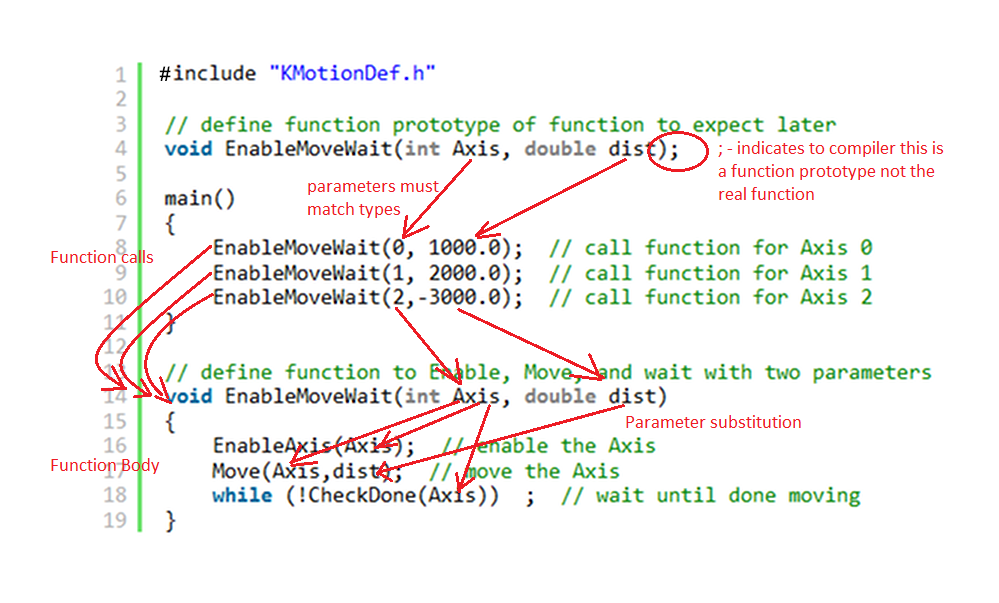
It is often desirable to place the functions toward the end of file with the main starting point of the program toward the beginning. This tends to make the program more readable and logical. This is not necessary but more a personal preference. Because the C Compiler only reads the program one time from beginning to end it is good to place at the beginning a description of any Functions that exist in the program. The allows the compiler to know the names of any functions and what parameter and return value types they have before they are used in the program. It is critical that the parameters passed in the call to the function are the exact correct number and type that are defined to be used by the function itself. So to inform the compiler of what function to expect a "function prototype" is specified. This is exactly the same as the function declaration itself except with no body of instructions. It consists of only one line followed by a semicolon to indicate it is only a prototype and not the entire function. See the Program below that has the function moved below the main function and with a function prototype at the beginning:
include "KMotionDef.h"

// define function prototype of function to expect later
void EnableMoveWait(int Axis, double dist);

main()
{
    EnableMoveWait(0, 1000.0);  // call function for Axis 0
    EnableMoveWait(1, 2000.0);  // call function for Axis 1
    EnableMoveWait(2,-3000.0);  // call function for Axis 2
}

// define function to Enable, Move, and wait with two parameters
void EnableMoveWait(int Axis, double dist)
{
    EnableAxis(Axis);  // enable the Axis
    Move(Axis,dist);  // move the Axis
    while (!CheckDone(Axis))  ;  // wait until done moving
}
Final C Program shown below with annotations
Basic Disk Read/Write
KFLOP has no file system on its own, but when connected to a PC with a PC App running it can do basic Disk Read or Write Operation. Read capability was recently added in Version 4.33q. There isn't any PC Keyboard access (getchar()). See the KmotionDef.h file for supported functions:
// Note: standard C language printf
int printf(const char *format, ...); // Print formatted string to console
int sprintf(char *s, const char *format, ...); // Print formatted string to string
typedef int FILE;
FILE *fopen(const char*, const char*); // Open a text file for writing on the PC (2nd param = "rt" or "wt")
int fprintf(FILE *f, const char * format, ...); // Print formatted string to the PC's Disk File
int fclose(FILE *f); // Close the disk file on the PC
int Print(char *s); // Print a string to the console window
int PrintFloat(char *Format, double v); // Print a double using printf format, ex "%8.3f\n"
int PrintInt(char *Format, int v); // Print an integer using printf format, ex "result=%4d\n"
int sscanf(const char *_str, const char *_fmt, ...); //scan string and convert to values
#define MAX_READ_DISK_LENGTH 1024 // max allowed length of disk file line length
extern volatile int read_disk_buffer_status; //status of read disk buffer 1=line available, 2=error, 3=eof
extern char read_disk_buffer[MAX_READ_DISK_LENGTH+1];
char *fgets(char *str, int n, FILE *file); //read string from PC disk file, str=buffer, n=buffer length, f=FILE pointer, returns NULL on error
int fscanf(FILE *f, const char *format, ...); //read sting from PC Disk file, convert values, returns number of items converted
int feof(FILE *f); // End of file status for disk reading
Simple DiskReadWrite.c example
include "KMotionDef.h"
main()
{
FILE *f;
char s[256];
double a=123.456,b=999.999,c=0.001;
double x=0,y=0,z=0;
int result;
// write 3 comma separated values to a disk file
f=fopen("c:\\Temp\\KFlopData.txt","wt");
fprintf(s,"%f,%f,%f\n",a,b,c);
fclose(f);
// read them back in
f=fopen("c:\\Temp\\KFlopData.txt","rt");
if (!f)
{
printf("Unable to open file\n");
return;
}
// read a line and convert 3 doubles
result=fscanf(f,"%lf,%lf,%lf",&x,&y,&z);
fclose(f);
printf("# values converted = %d, x=%f, y=%f, z=%f\n",result,x,y,z);
}
Global Persist Variables
KFLOP contains a global array of 200 32-bit integer variables that can be used to save values from one program execution to the next or to share values between Threads or Programs. The values default to zero on KFLOP Power up but if the variables are changed and Flash User Data is performed to KFLOP the values will persist after the next power cycle. From C the values can be accessed as (where xxx is a number 0-199):
persist.UserData[xxx]
32-bit Floating point variables can be read or written to the variables using casting. The technique to avoid a compiler conversion to integer is to take the address of the variable, cast it to a pointer to an integer, then de-reference the pointer. The C syntax is:
persist.UserData[xxx] = *(int *) & my_float;
my_float = *(float *) &persist.UserData[xxx];
64-bit Floating point variables can be read or written to a pair of UserData Variables. Using these functions (KflopToKMotionCNCFunctions.c)
double GetUserDataDouble(int i)
{
double d;
((int*)(&d))[0] = persist.UserData[i*2];
((int*)(&d))[1] = persist.UserData[i*2+1];
return d;
}
void SetUserDataDouble(int i, double v)
{
double d=v;
persist.UserData[i*2] = ((int*)(&d))[0];
persist.UserData[i*2+1] = ((int*)(&d))[1] ;
}
The PC can also access these variables with Console Script Commands: SetPersistDec, GetPersistDec, SetPersistHex, GetPersistHex.
For easy and fast access several persist variables are uploaded in the KFLOP Main Status Record as defined below in PC-DSP.h. Certain PC Applications like KMotionCNC make use of these to receive commands from KFLOP to perform various actions. The supported command codes are defined in PC-DSP.h
define PC_COMM_PERSIST 100 // First Persist Variable that is uploaded in status
#define N_PC_COMM_PERSIST 8 // Number of Persist Variables that are uploaded in status
The member variable of Main Status:
int PC_comm[N_PC_COMM_PERSIST];// 8 persist Variables constantly uploaded to send misc commands/data to PC
Threads and KMotion.exec C Programs Screen
KFLOP can have multiple (1 System Program and up to 7 User ) programs loaded into memory and executing concurrently. Each program gets a time slice of execution time on a deterministic periodic basis. For more information see here:
The KMotion.exe C Programs Screen contains C Source Code Edit Windows that facilitate editing, developing, compiling, executing, and debugging C Programs.
A common misconception is that the KMotion.exe Source Code Edit Windows is the same as what is currently in the KFLOP Thread Memory Spaces. This is not necessarily the case. If the Source Code has not been Compiled and Downloaded to the KFLOP Thread then something else may be in the KFLOP Thread Space. KMotion.exe remembers what Programs were last loaded into the edit windows but again this is not what might be what is in KFLOP. After all the C Programs have been developed the KMotion.exe C Programs Screen is no longer used or needed.
C Source code is not downloaded to KFLOP. Only the compiled binary executable code is downloaded to KFLOP memory. There is no means of recovering the C Source Code from only the binary executable code.
Although C Programs can be Flashed to KFLOP memory so they will be present in KFLOP Memory on Power up this is not normally recommended and not usually required. KFLOP normally powers up with no C Programs in Memory. Programs can be compiled, downloaded, and executed dynamically in Threads by Applications at run time. They do not need to be pre-loaded (or Flashed) into KFLOP Memory. For example when KMotionCNC executes GCode and encounters an M3 it may download the configured C Program to the Configured Thread and execute it.
Note that different programs can be executed in the same Thread Space as long as they are used at different times. If a new program is downloaded to a Thread that has a previously loaded program executing, the previous program execution is halted and then the new program is loaded into the Thread's memory.
C Program Size and Stack Limitations
Each of the first 6 User Thread Memory Spaces are limited to 64KBytes (65536 Bytes). Thread 7 is larger and limited to 5x64KBytes (327680Bytes).
If subsequent Threads are unused it is possible to overflow into their Thread Spaces.
When compiling a message is displayed showing the Memory Usage. The total value indicates the total amount of memory used and must fit into the allowed memory space.
No Errors, No Warnings, text=100, bss=0, data=14, total=160
Each User Thread Stack is located in precious single cycle (5ns) internal memory and is 2 KBytes in length. Care should be used to limit stack usage. Overflowing the stack will likely cause KFLOP to crash. Local variables (defined within functions) and passed function parameters reside on the stack. Large variables should be defined as Global Variables or in the 8 MByte Gather Buffer
Gather Buffer
KFLOP contains a relatively large global array (8MBytes) of 1 million double precision floating point values that can be used by C Programs. It is often used for capturing/gathering data so it is named the gather_buffer. KMotionCNC Step Response Screen uses this memory. But the memory can be used for any purpose.
The Gather Buffer is defined in KMotionDef.h as:
define MAX_GATHER_DATA 1000000 // Size of gather buffer (number of doubles, 8 bytes each).
extern double *gather_buffer; // Large buffer for data gathering, Bode plots, or User use
C access syntax is gather_buffer[xxx] where xxx is in the range 0 ... 999999.
The gather_buffer pointer can be cast as other types to make use of the memory. ie:
int *gather_buffer_int = (int *)gather_buffer;
The PC can also access the gather buffer with Console Script Commands:
GetGatherDec SetGatherDec GetGatherHex SetGatherHex
Performing multiple Operations continually in a forever Loop
It doesn't make logical sense to have more than one forever loop in a program. That would be like saying to someone go and check if any mail arrived over and over forever and then when you are done with that go and check if someone is at the back door over and over forever. Obviously the back door will never get around to being checked.
The solution is to create a single loop that checks two things each time through the loop. #1 go check the mail, #2 go check the back door, # 3 repeat. Using this technique any number of things can be continuously performed in a single loop.
There is one catch with this technique. None of the operations should "block" or take a significant amount of time to perform. If you were to perform an operation that took a long time to complete all the other continuous operations would be blocked and go unserviced for that period of time. If it is required to do something that takes a significant amount of time then the solution is to break it down into pieces (states) that can be each performed in an insignificant amount of time. For example say you wish to activate a lubrication relay for 2 seconds each time a button is pushed. Instead of delaying 2 seconds you would instead record the time the relay was turned on, then go off and do other things while frequently returning to see if it is time to turn the relay off.
Below is an example to cycle an IO bit continuously based on time. Note that although this is a complete example for testing you would normally already have a forever loop in your Initialization program. In that case only add the ServiceTimerSequence Function to your Initialization Program and add the Function call to your existing forever loop.
#include "KMotionDef.h"

void ServiceTimerSequence(void);

main()
{
	for (;;) // loop forever
	{
		WaitNextTimeSlice(); // execute loop once every time slice
		ServiceTimerSequence();  // service the timer sequencing
	}   // end of forever loop
}


// sequence an IO Bit Based on Time in a non-blocking manner

#define TIME_ON 5.0 //seconds
#define CYCLE_TIME 15.0 //seconds
#define OUTPUT_BIT 46 // which IO bit to drive
void ServiceTimerSequence(void)
{
	static double T0=0.0;  // remember the last time we turned on
	double T=Time_sec(); // get current Time_sec

	if (T0==0.0 || T > T0 + CYCLE_TIME) T0=T;  // set start time of cycle

	if (T < T0 + TIME_ON)  // are we within the TIME_ON section of the cycle?
		SetBit(OUTPUT_BIT);  //yes
	else
		ClearBit(OUTPUT_BIT);  //no
}

