

Difference between revisions of "Main Page"
From Dynomotion
m (→PC Example Applications) |
(Axis Resolution - counts/inch (or counts/mm)) |
||
| Line 151: | Line 151: | ||
<div class="yiv2818182665class" style="color: #000000; font-size: 13.3333px; font-family: HelveticaNeue, Helvetica Neue, Helvetica, Arial, Lucida Grande, sans-serif; background-color: transparent; font-style: normal;">It is usually best to first determine max possible velocity using a relatively low acceleration. Maximum power is usually required at the point of the trajectory where velocity is high and still accelerating. Supply Voltage limitations tend to limit velocity. Current limitations tend to limit acceleration.<br /><br /></div> | <div class="yiv2818182665class" style="color: #000000; font-size: 13.3333px; font-family: HelveticaNeue, Helvetica Neue, Helvetica, Arial, Lucida Grande, sans-serif; background-color: transparent; font-style: normal;">It is usually best to first determine max possible velocity using a relatively low acceleration. Maximum power is usually required at the point of the trajectory where velocity is high and still accelerating. Supply Voltage limitations tend to limit velocity. Current limitations tend to limit acceleration.<br /><br /></div> | ||
<div class="yiv2818182665class" style="color: #000000; font-size: 13.3333px; font-family: HelveticaNeue, Helvetica Neue, Helvetica, Arial, Lucida Grande, sans-serif; background-color: transparent; font-style: normal;"></div> | <div class="yiv2818182665class" style="color: #000000; font-size: 13.3333px; font-family: HelveticaNeue, Helvetica Neue, Helvetica, Arial, Lucida Grande, sans-serif; background-color: transparent; font-style: normal;"></div> | ||
| − | + | <div class="yiv2818182665class" style="color: #000000; font-size: 13.3333px; font-family: HelveticaNeue, Helvetica Neue, Helvetica, Arial, Lucida Grande, sans-serif; background-color: transparent; font-style: normal;">[[File:MaxVelAccelPower.png|none|link=|485x361px]]<br />The Step Response Screen always performs 3rd order motion but 2nd order motion can be simulated by temporarily setting the Jerk to a huge value (1000X the acceleration value). In general reducing the Jerk value will result in longer times to perform motions, but often the improved smoothness will permit higher maximum accelerations and velocities to be used resulting in overall shorter motion times. An analogy might be how you might stop more quickly in a car, without skidding or spilling your coffee, by applying the brakes harder in a more gradual manner rather than slamming on the brakes.<br /><br /><span class="yiv2818182665class">Make</span> sure when testing the size of move is long enough for full acceleration and velocity are achieved. As a common mistake is to have Acceleration or Velocity Settings set to too high for your system but when testing a short move there is no indication of a problem. The plot mode of Velocity Output vs Time can be helpful to verify full Velocity is being achieved.<span id=".C2.A0" class="mw-headline"> <br /></span></div> | |
| − | </div> | + | <div class="yiv2818182665class" style="color: #000000; font-size: 13.3333px; font-family: HelveticaNeue, Helvetica Neue, Helvetica, Arial, Lucida Grande, sans-serif; background-color: transparent; font-style: normal;"> </div> |
<div class="yiv2818182665class" style="color: #000000; font-size: 13.3333px; font-family: HelveticaNeue, Helvetica Neue, Helvetica, Arial, Lucida Grande, sans-serif; background-color: transparent; font-style: normal;"></div> | <div class="yiv2818182665class" style="color: #000000; font-size: 13.3333px; font-family: HelveticaNeue, Helvetica Neue, Helvetica, Arial, Lucida Grande, sans-serif; background-color: transparent; font-style: normal;"></div> | ||
| + | ===<span class="mw-headline">Axis Resolution - counts/inch (or counts/mm)</span>=== | ||
| + | <div class="yiv2818182665class" style="color: #000000; font-size: 13.3333px; font-family: HelveticaNeue, Helvetica Neue, Helvetica, Arial, Lucida Grande, sans-serif; background-color: transparent; font-style: normal;"></div> | ||
| + | <div class="yiv2818182665class" style="color: #000000; font-size: 13.3333px; font-family: HelveticaNeue, Helvetica Neue, Helvetica, Arial, Lucida Grande, sans-serif; background-color: transparent; font-style: normal;"><span class="mw-headline">Its important to understand the resolution of your Axis which is the number of fundamental raw motor/driver encoder counts or motor steps per standard unit of distance (inch or mm). Although tuning in KMotion.exe Ste Response Screen and motions within KFLOP typically use units of raw counts or steps it is important to know how these translate to real-world distances, speeds, etc... Later, applications such as KMotionCNC or Mach3 will need this information to scale motions properly.<br /></span></div> | ||
| + | <div class="yiv2818182665class" style="color: #000000; font-size: 13.3333px; font-family: HelveticaNeue, Helvetica Neue, Helvetica, Arial, Lucida Grande, sans-serif; background-color: transparent; font-style: normal;"></div> | ||
| + | <div class="yiv2818182665class" style="color: #000000; font-size: 13.3333px; font-family: HelveticaNeue, Helvetica Neue, Helvetica, Arial, Lucida Grande, sans-serif; background-color: transparent; font-style: normal;"><span class="mw-headline">There are usually a number of factors that combine together to determine the Axis Resolution. These might include:</span></div> | ||
| + | * <span class="mw-headline">counts or steps per motor revolution</span> | ||
| + | * <span class="mw-headline">any gearing or belts and pulleys involved between motor and drive mechanisms</span> | ||
| + | * <span class="mw-headline">lead screw pitch, rack and pinion tooth pitch, drive belt radius, etc.</span> | ||
| + | |||
| + | <span class="mw-headline">For example consider a Stepper Drive with:</span> | ||
| + | |||
| + | <span class="mw-headline">3200 steps per motor rev</span> | ||
| + | |||
| + | <span class="mw-headline">2:1 gear reduction from motor to lead screw</span> | ||
| + | |||
| + | <span class="mw-headline">0.2 inch lead screw pitch</span> | ||
| + | |||
| + | |||
| + | <span class="mw-headline">Axis Resolution = 3200 step/motor rev x (2 motor rev/ screw rev) / (0.2 inch / screw rev) = 32000 steps/inch</span> | ||
| + | |||
| + | |||
| + | <span class="mw-headline">To determine whether your assumptions and calculations are correct perform a test. Command as large of a move as convenient and measure the actual distance moved with a ruler. For example in the axis described above you might command a move of 320000 steps. This should result in a motion of:</span> | ||
| + | |||
| + | <span class="mw-headline">320000 steps / (32000 steps/inch) = 10 inches.</span> | ||
| + | |||
| + | |||
| + | <span class="mw-headline">For KMotionCNC set the Axis Resolution in the [http://dynomotion.com/Help/KMotionCNC/ToolSetupScreenTP.htm#Axis_Motion_Parameters Tool Setup | Trajectory Planner Screen | Axis Parameters | cnts/inch]. Note units must be in units of inches. If your resolution is in mm units multiply by 25.4.</span> | ||
| + | |||
| + | |||
| + | <span class="mw-headline">For Mach3 enter the Axis Resolution in the Configuration | Motor Tuning Screen. Make sure the setup units (not GCode units) match the mode of your values.</span> | ||
| + | |||
| + | |||
| + | |||
| + | <div class="yiv2818182665class" style="color: #000000; font-size: 13.3333px; font-family: HelveticaNeue, Helvetica Neue, Helvetica, Arial, Lucida Grande, sans-serif; background-color: transparent; font-style: normal;"></div> | ||
| + | <div class="yiv2818182665class" style="color: #000000; font-size: 13.3333px; font-family: HelveticaNeue, Helvetica Neue, Helvetica, Arial, Lucida Grande, sans-serif; background-color: transparent; font-style: normal;"></div> | ||
| + | <div class="yiv2818182665class" style="color: #000000; font-size: 13.3333px; font-family: HelveticaNeue, Helvetica Neue, Helvetica, Arial, Lucida Grande, sans-serif; background-color: transparent; font-style: normal;"></div> | ||
===Noisy GCode - Trajectory Planner Smoothing=== | ===Noisy GCode - Trajectory Planner Smoothing=== | ||
<div class="yiv2818182665class" style="color: #000000; font-size: 13.3333px; font-family: HelveticaNeue, Helvetica Neue, Helvetica, Arial, Lucida Grande, sans-serif; background-color: transparent; font-style: normal;">An analysis of Quantization Noise in GCode and Trajectory Planner Settings to generate smooth motion.<br />[[File:GCode_Noisy_Path.png|none|link=|432x432px]]</div> | <div class="yiv2818182665class" style="color: #000000; font-size: 13.3333px; font-family: HelveticaNeue, Helvetica Neue, Helvetica, Arial, Lucida Grande, sans-serif; background-color: transparent; font-style: normal;">An analysis of Quantization Noise in GCode and Trajectory Planner Settings to generate smooth motion.<br />[[File:GCode_Noisy_Path.png|none|link=|432x432px]]</div> | ||
<div class="yiv2818182665class" style="color: #000000; font-size: 13.3333px; font-family: HelveticaNeue, Helvetica Neue, Helvetica, Arial, Lucida Grande, sans-serif; background-color: transparent; font-style: normal;">[[Trajectory Planner Smoothing Noisy GCode|See Analysis and Solution]]</div> | <div class="yiv2818182665class" style="color: #000000; font-size: 13.3333px; font-family: HelveticaNeue, Helvetica Neue, Helvetica, Arial, Lucida Grande, sans-serif; background-color: transparent; font-style: normal;">[[Trajectory Planner Smoothing Noisy GCode|See Analysis and Solution]]</div> | ||
<div class="yiv2818182665class" style="color: #000000; font-size: 13.3333px; font-family: HelveticaNeue, Helvetica Neue, Helvetica, Arial, Lucida Grande, sans-serif; background-color: transparent; font-style: normal;"></div> | <div class="yiv2818182665class" style="color: #000000; font-size: 13.3333px; font-family: HelveticaNeue, Helvetica Neue, Helvetica, Arial, Lucida Grande, sans-serif; background-color: transparent; font-style: normal;"></div> | ||
| + | |||
==Problems and Resolutions== | ==Problems and Resolutions== | ||
====General==== | ====General==== | ||
Revision as of 13:39, 31 March 2016
Contents
- 1 Dynomotion wiki
- 2 Editing and Creating Wiki Pages
- 3 Dynomotion Software Topics
- 4 Dynomotion Hardware Topics
- 5 Axes Servo Tuning and Trajectory Planner
- 6 Problems and Resolutions
- 7 Applications and Projects
- 8 International and other Languages
Dynomotion wiki
Welcome to our wiki where you can find and share knowledge on Dynomotion's systems. To begin adding information to this wiki, simply create an account, verify your email, and start editing (click pencil icon). To make editing pages easier for everyone, we have installed a visual editor by default. This visual editor allows you to edit a wiki page much like you would a standard word processing document. For the seasoned wiki editors, standard MediaWiki editing may also be used.
Warning: Use at your own risk. Information is for example purposes only and may contain errors. It is up to the User to verify the information is correct and is safe to use. In no case will any contributor or Dynomotion be liable for incorrect information. Dynomotion reserves the right to modify or delete any contributions.
Thanks for Contributing!
Editing and Creating Wiki Pages
Unintuitively, you first create a link to the page you want to make before you can make the page. To make a new page: while editing, right-click where you want your link to be, insert a link with a descriptive title and link text, save the page, click on the link you created, then click on "Empty Page" to begin editing your new page.
Here are a few other quick tips:
- You can insert links or images by Right-Clicking with the mouse on the line where you want the link or image to appear.
- For Spell Correction you can use Ctrl-Right-Click.
- To insert a YouTube Video use an EmbedVideo command such as {{#ev:youtube|xxxxx}} with xxxxx changed to the Video ID.
- Choose a descriptive page name and link text when creating a new page: e.g. Not "My Machine", but rather "Brand X Three Axis Milling Machine Retrofit"
- Create pages in an organized manner: Describe what the page is about, create clear sections that flow
For more information:
How to Edit and insert Media into your wiki pages
Dynomotion Software Topics
Installation Topics
- Latest Production Release: Full release download page (includes link to signed Windows Drivers)
- Upgrading from previous KMotion Versions
- Latest Test Release: Released 08/29/2015: KMotion.exe V4.33q, See the release notes for this test version here: V4.33q release notes (pdf)
- How to install KMotion.exe and KMotionCNC
- Preparing Windows 10 for driver installation
- How to update KFLOP Firmware - whenever a new version of software is installed, the firmware within KFLOP must be updated to match the new version
KMotion.exe Executive Software Topics
KMotion.exe is the main program that is used to configure settings in KFLOP, initialize axes, and to write C programs to configure and setup KFLOP to control your system. In this program you can plot step response, test movement, view Bode plots, monitor I/O, set filter parameters, and generally set the pertinent parameters.
- General software information from the manuals
- Insert pages for other KMotion.exe-related topics here
Configuration Topics
Channels, Channels, Channels what are they?
How to Setup Backlash Compensation
KMotionCNC Software Topics
KMotionCNC is Dynomotion's CNC program used as a graphical user interface to your KFLOP-enabled machine tool. KMotionCNC has all of the basic functionality you need to run a machine of up to 6 axes, in addition to spindle control.
- Insert pages for other KMotionCNC-related general topics here
Using KMotionCNC
- Homing discussion - page to be created
- Insert other KMotionCNC use pages here
Known KMotionCNC CAD/CAM Post Processors
Customize KMotionCNC
KMotionCNC is written as a Windows C++ MFC (Microsoft Foundation Classes) program developed in Visual Studio. Source code is provided and may be customized using Visual Studio. MFC Support is a requirement.
- General Information
- Compiling KMotionCNC
- The KMotionCNC's Visual Studio Project Solution (\PC VC Programs\KMotionCNC\KMotionCNC.sln) is currently written for Visual Studio 2008 Standard. This version can be used for the simplest compatibility. Projects can be upgraded to newer version of VS with minimal effort. Including Microsoft's Free Visual Studio 2013 Community. More info on PC Example Applications.
- KMotionCNC Customization Examples and Applications
- Links to examples of projects that explain KMotionCNC customizations
- Troy (tmday7) created some helpful documents listed on the Yahoo Group Files Section here.
- Links to examples of projects that explain KMotionCNC customizations
PC Example Applications
A number of PC Applications using the KMotion Libraries are available in the Software download. Visual Studio should be used to modify/compile the applications.
Currently the projects are compatible with VS 2008 Standard but later Versions can upgrade the projects and can be used including the free Microsoft Version of VS 2013 Community. In some cases MFC capability needs to be added as a separate download.
Note All the projects in KMotion Versions 4.34a and later have now been updated and should work out-of-the-box with VS2015.
KMotion Libraries - GCode Interpreter - Trajectory Planner - Coordinated Motion - .NET
The KMotion Libraries are a series of DLLs (Dynamic Link Libraries) that reside on the PC that contain the common core motion control, I/O, and communication functionality for KFLOP. These libraries permit PC Applications to be built using high level control without being concerned with the underlying details of Interpreting GCode, Trajectory Planning, Coordinated Motion, Motion Buffering, USB Communication, etc.
KFLOP C Programs
C Programs provide a powerful and flexible capability to perform almost any sequence of operations within KFLOP. In most cases after you have tested and tuned all your hardware using the KMotion.exe setup program all the settings and initialization steps required for your system can be placed into an Initialization C Program so that your system can be fully initialized simply by executing the Initialization program.
ModBus
Modbus can be connected to the PC or directly to KFLOP. A PC connection will not be deterministically real-time but may work for basic speed control and on/off. Here is a related Thread for interfacing KMotionCNC to Modbus using a free utility.
https://groups.yahoo.com/neo/groups/DynoMotion/conversations/topics/7941
To connect Modbus directly to KFLOP's UART see the C Examples in \C Programs\RS232\ModBus\
Dynomotion Hardware Topics
General Hardware Information
KFLOP Hardware Info
KStep Hardware Info
Kanalog Hardware Info
SnapAmp Hardware Info
Konnect Hardware Info
Wiring Diagrams
Basic Kanalog DAC and Encoder Connections 3 Axis
Basic Kanalog DAC and Encoder Connections 3 Axis #2
KFLOP+SnapAmp DC Brush Motors with MPG
KFLOP JP5 Open Collector Step/Dir Connections to Power Step PSD5042-2P Drives
KFLOP+KStep with VFD and NPN Limit Switches for Matrika Rev1
Wiring Topics
Place links to pages on wiring inputs and outputs specific to your experiences and projects. Be descriptive with page titles and links.
MPG Wiring and Interface
MPGs (Manual Pulse Generators) should be connected directly to KFLOP for guaranteed real-time response (not USB based or connected to the PC). MPGs are handled by a C Program that monitors the MPG and creates motion based on the MPG Encoder changes and switch selections for axis, speed, and so forth. See the MPG C Program Examples. Here is a Discussion with other links.
https://groups.yahoo.com/neo/groups/DynoMotion/conversations/messages/12287

Axes Servo Tuning and Trajectory Planner
Velocity, Acceleration, and Jerk
The KMotionCNC parameters are used for 2nd order (infinite Jerk) coordinated motion paths. These are GCode G1,G2,G3 continuous paths. The units are in Inches (or in some cases degrees).
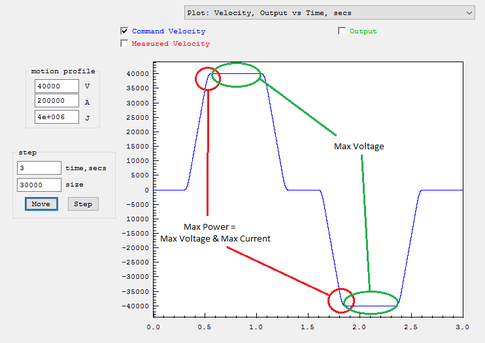
The Step Response Screen always performs 3rd order motion but 2nd order motion can be simulated by temporarily setting the Jerk to a huge value (1000X the acceleration value). In general reducing the Jerk value will result in longer times to perform motions, but often the improved smoothness will permit higher maximum accelerations and velocities to be used resulting in overall shorter motion times. An analogy might be how you might stop more quickly in a car, without skidding or spilling your coffee, by applying the brakes harder in a more gradual manner rather than slamming on the brakes.
Make sure when testing the size of move is long enough for full acceleration and velocity are achieved. As a common mistake is to have Acceleration or Velocity Settings set to too high for your system but when testing a short move there is no indication of a problem. The plot mode of Velocity Output vs Time can be helpful to verify full Velocity is being achieved.
Axis Resolution - counts/inch (or counts/mm)
- counts or steps per motor revolution
- any gearing or belts and pulleys involved between motor and drive mechanisms
- lead screw pitch, rack and pinion tooth pitch, drive belt radius, etc.
For example consider a Stepper Drive with:
3200 steps per motor rev
2:1 gear reduction from motor to lead screw
0.2 inch lead screw pitch
Axis Resolution = 3200 step/motor rev x (2 motor rev/ screw rev) / (0.2 inch / screw rev) = 32000 steps/inch
To determine whether your assumptions and calculations are correct perform a test. Command as large of a move as convenient and measure the actual distance moved with a ruler. For example in the axis described above you might command a move of 320000 steps. This should result in a motion of:
320000 steps / (32000 steps/inch) = 10 inches.
For KMotionCNC set the Axis Resolution in the Tool Setup | Trajectory Planner Screen | Axis Parameters | cnts/inch. Note units must be in units of inches. If your resolution is in mm units multiply by 25.4.
For Mach3 enter the Axis Resolution in the Configuration | Motor Tuning Screen. Make sure the setup units (not GCode units) match the mode of your values.
Noisy GCode - Trajectory Planner Smoothing

Problems and Resolutions
General
- Dealing with noise on inputs. If you experience issues with inputs misreading, the issue may be noise. This page provides examples on what might be causing noise issues and examples of how to possibly deal with noise.
- Other
Software-Specific Problems and Resolutions
- Place links to pages explaining resolutions to problems that are largely software-related here
Hardware-Specific Problems and Resolutions
- Place links to pages explaining resolutions to problems that are largely hardware-related
Step/Dir Drives loose 2 Steps for each pair of Direction Reversals
Applications and Projects
- Place links to pages that explain how you accomplished your particular project. Write clear explanations that provide background on what you did and how you did it.
Tool Changer - router linear 4 Tools - C Program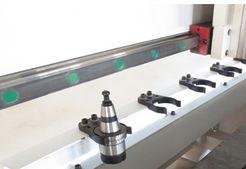
Part Zero & Tool Height Touch Plate

