Dynomotion

Group: DynoMotion Message: 14908 From: jackgiz@ymail.com Date: 7/7/2017
Subject: 4th Axis Post Processor

Tom,

I'm building a 4th axis for my CNC machine and will be generating the \G code files in Aspire.  The tutorials say to use a post processor for your machine that has the word "wrap" in the title.  For example:


Mach 2/3-WrapYtoA ATC (inch).


 Here are the only PP in the Aspire list for EMC2:


EMC2-G61 arcs(inch)

EMC2-G64 arcs (inch) neither of which seem to have anything to do with a 4th axis

and 

EMC2-arcs(inch) which is the one I normally use.


Any suggestions?


Jack


Group: DynoMotion Message: 14909 From: Tom Kerekes Date: 7/7/2017
Subject: Re: 4th Axis Post Processor

Hi Jack,

Are you using Mach3 or KMotionCNC?

What are you trying to accomplish?

How does your system work?  Could you command multiple revolutions?   ie A0 to A3600 to do 10 revolutions of 360 degrees?

KMotionCNC doesn't support any "wrapping" in the sense that A359 to A1 would just be a +2 degree move.

Regards

TK


On 7/7/2017 9:04 PM, jackgiz@... [DynoMotion] wrote:
 

Tom,

I'm building a 4th axis for my CNC machine and will be generating the \G code files in Aspire.  The tutorials say to use a post processor for your machine that has the word "wrap" in the title.  For example:


Mach 2/3-WrapYtoA ATC (inch).


 Here are the only PP in the Aspire list for EMC2:


EMC2-G61 arcs(inch)

EMC2-G64 arcs (inch) neither of which seem to have anything to do with a 4th axis

and 

EMC2-arcs(inch) which is the one I normally use.


Any suggestions?


Jack


Group: DynoMotion Message: 14912 From: Jack Date: 7/8/2017
Subject: Re: 4th Axis Post Processor

Hi Tom,

I’m using KMotionCNC.  The reference to Mach3 was only an example of the PostP that I saw in Aspire.


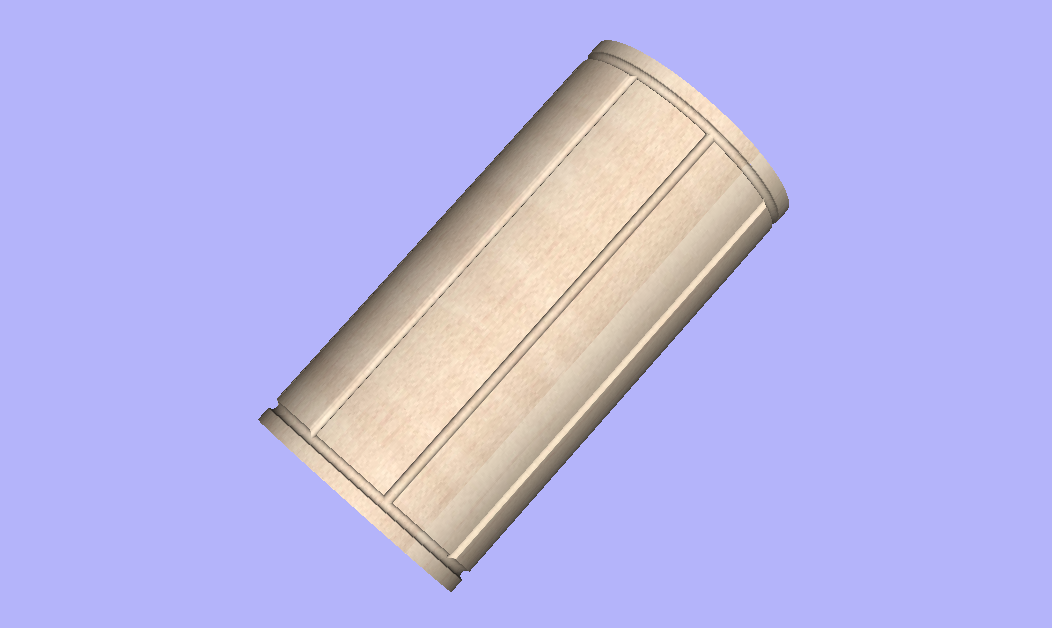
What am I trying to accomplish?  I’m retired and can’t leave well enough alone.  I saw some examples of things made using a 4th axis and thought it would be cool to have one.  I built the 4th axis and watched some tutorials on the Vectric website on 4th axis machining.  That’s where I learned about the wrapping PostP.  I saved an example G code file using the EMC2-Arcs(inch) PostP for a simple fluted cylinder design that has a 6” diameter by 12” long.   I see X, Y, and Z commands in the code but nothing for A (see attached picture file of fluted cylinder and Gcode to cut it).  The Y axis is the 12” dim and the X is wrapped around the Y.  The ninth line of code says “G1X18.8496F100.0” or move X 6*pi at a speed of 100 or one full revolution around the cylinder.  Looks like it is going to make the cut in 2 passes, both times traveling 6*pi.  I don’t see anything that looks like angular rotation.


I have a Kflop and Kstep driving X, Y (slaved) and Z.  I plan on driving the A with a Gecko off JP5.  I expect to have this wired sometime this week.  The 4th Axis is a standard 1.8 degree/step stepper with a 10 tooth pulley driving a 30 tooth pulley.  I believe that the stepper would react to an A 0 to A3600 and make 10 revolutions.


Where do I go from here?  Do I just unplug the X axis and plug in the 4th axis and forget wiring up the Gecko?  That just doesn’t seem right not to mention very dangerous for my Kstep.


Jack


From: DynoMotion@yahoogroups.com [mailto:DynoMotion@yahoogroups.com]
Sent: Saturday, July 08, 2017 12:53 AM
To: DynoMotion@yahoogroups.com
Subject: Re: [DynoMotion] 4th Axis Post Processor


Hi Jack,

Are you using Mach3 or KMotionCNC?

What are you trying to accomplish?

How does your system work?  Could you command multiple revolutions?   ie A0 to A3600 to do 10 revolutions of 360 degrees?

KMotionCNC doesn't support any "wrapping" in the sense that A359 to A1 would just be a +2 degree move.

Regards

TK


On 7/7/2017 9:04 PM, jackgiz@... [DynoMotion] wrote:


Tom,

I'm building a 4th axis for my CNC machine and will be generating the \G code files in Aspire.  The tutorials say to use a post processor for your machine that has the word "wrap" in the title.  For example:


Mach 2/3-WrapYtoA ATC (inch).


 Here are the only PP in the Aspire list for EMC2:


EMC2-G61 arcs(inch)

EMC2-G64 arcs (inch) neither of which seem to have anything to do with a 4th axis

and 

EMC2-arcs(inch) which is the one I normally use.


Any suggestions?


Jack


  @@attachment@@
Group: DynoMotion Message: 14914 From: Jack Date: 7/9/2017
Subject: Re: 4th Axis Post Processor

Hi Tom,

Forget the previous email.  I figured out how to modify the Mach3 Wrapped PostP to work with KmtionCNC.  I’m now getting an A axis and angular movement.  It appears I have solved the theoretical side of the problem, now to see if it translates to the practical side.


Attached is a copy of the GCode for the side fluted cylinder I sent earlier but after using the updated PostP.


Jack


From: DynoMotion@yahoogroups.com [mailto:DynoMotion@yahoogroups.com]
Sent: Saturday, July 08, 2017 12:53 AM
To: DynoMotion@yahoogroups.com
Subject: Re: [DynoMotion] 4th Axis Post Processor


Hi Jack,

Are you using Mach3 or KMotionCNC?

What are you trying to accomplish?

How does your system work?  Could you command multiple revolutions?   ie A0 to A3600 to do 10 revolutions of 360 degrees?

KMotionCNC doesn't support any "wrapping" in the sense that A359 to A1 would just be a +2 degree move.

Regards

TK


On 7/7/2017 9:04 PM, jackgiz@... [DynoMotion] wrote:


Tom,

I'm building a 4th axis for my CNC machine and will be generating the \G code files in Aspire.  The tutorials say to use a post processor for your machine that has the word "wrap" in the title.  For example:


Mach 2/3-WrapYtoA ATC (inch).


 Here are the only PP in the Aspire list for EMC2:


EMC2-G61 arcs(inch)

EMC2-G64 arcs (inch) neither of which seem to have anything to do with a 4th axis

and 

EMC2-arcs(inch) which is the one I normally use.


Any suggestions?


Jack


  @@attachment@@
Group: DynoMotion Message: 14917 From: Tom Kerekes Date: 7/10/2017
Subject: Re: 4th Axis Post Processor [1 Attachment]

Hi Jack,

I was looking at the original code and:

#1 Scaled the X axis to be degrees

#2 Global replace of X -> B

#3 Subtracted 3 inches from Z (to be relative to 6 inch diameter)

Then I configured the KMotion CNC B Axis as Degrees Radius=3.0

I think the B Axis angle should be used for rotation around the Y axis.

But that showed up a bug in GCode Viewer with regard to big Angle Changes (normally for short GCode vectors a straight line worked ok, but it doesn't for big B angles)

Here is a GViewer Simulation after fixing the bug:

https://youtu.be/fr4csTrJvL0

I can provide you a patch if you are interested.

Let us know how it works out.

Regards

TK


On 7/9/2017 3:36 PM, 'Jack' jackgiz@... [DynoMotion] wrote:
 

Hi Tom,

Forget the previous email.  I figured out how to modify the Mach3 Wrapped PostP to work with KmtionCNC.  I’m now getting an A axis and angular movement.  It appears I have solved the theoretical side of the problem, now to see if it translates to the practical side.


Attached is a copy of the GCode for the side fluted cylinder I sent earlier but after using the updated PostP.


Jack


From: DynoMotion@yahoogroups.com [mailto:DynoMotion@yahoogroups.com]
Sent: Saturday, July 08, 2017 12:53 AM
To: DynoMotion@yahoogroups.com
Subject: Re: [DynoMotion] 4th Axis Post Processor


Hi Jack,

Are you using Mach3 or KMotionCNC?

What are you trying to accomplish?

How does your system work?  Could you command multiple revolutions?   ie A0 to A3600 to do 10 revolutions of 360 degrees?

KMotionCNC doesn't support any "wrapping" in the sense that A359 to A1 would just be a +2 degree move.

Regards

TK


On 7/7/2017 9:04 PM, jackgiz@... [DynoMotion] wrote:


Tom,

I'm building a 4th axis for my CNC machine and will be generating the \G code files in Aspire.  The tutorials say to use a post processor for your machine that has the word "wrap" in the title.  For example:


Mach 2/3-WrapYtoA ATC (inch).


 Here are the only PP in the Aspire list for EMC2:


EMC2-G61 arcs(inch)

EMC2-G64 arcs (inch) neither of which seem to have anything to do with a 4th axis

and 

EMC2-arcs(inch) which is the one I normally use.


Any suggestions?


Jack


Group: DynoMotion Message: 14920 From: Jack Date: 7/10/2017
Subject: Re: 4th Axis Post Processor

Hi Tom,

Thanks for looking into to this for me.  I’ve changed the PostP to specify the B axis instead of A.  I also changed the Z zero from the center of rotation to the perimeter of the cylinder.  I would certainly be interested in the patch for the viewer.


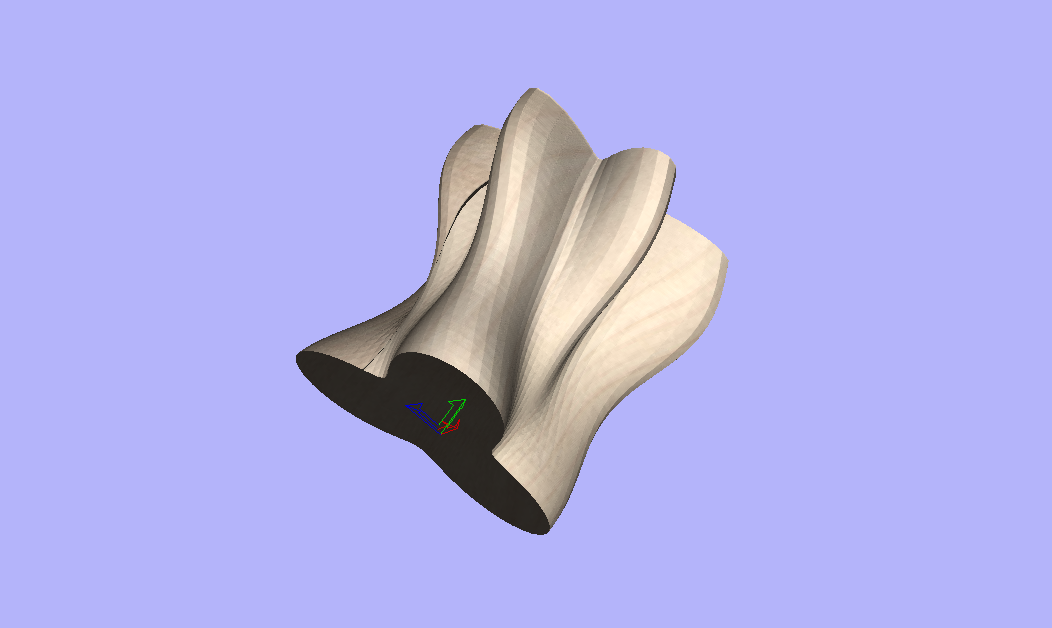
The example of the fluted cylinder was step one to prove out that I could generate a PostP for wrapping and to learn how to do wrapping in Aspire.  However, longer term I am interested in doing shaped forms.  I’ve attached a picture and Gcode of an example.  Will something like this be possible? 


If I select the degrees check box in the B axis motion parameters what radius do I enter?  Why is a radius required if I enter a number for Cnts/deg?


When I run the simulation I get an error “F word missing with inverse time g1 move”.  It doesn’t seem to matter if the G93 command is in the code or not.  Does each line of code require a speed command also?


Jack


From: DynoMotion@yahoogroups.com [mailto:DynoMotion@yahoogroups.com]
Sent: Monday, July 10, 2017 4:27 PM
To: DynoMotion@yahoogroups.com
Subject: Re: [DynoMotion] 4th Axis Post Processor


Hi Jack,

I was looking at the original code and:

#1 Scaled the X axis to be degrees

#2 Global replace of X -> B

#3 Subtracted 3 inches from Z (to be relative to 6 inch diameter)

Then I configured the KMotion CNC B Axis as Degrees Radius=3.0

I think the B Axis angle should be used for rotation around the Y axis.

But that showed up a bug in GCode Viewer with regard to big Angle Changes (normally for short GCode vectors a straight line worked ok, but it doesn't for big B angles)

Here is a GViewer Simulation after fixing the bug:

https://youtu.be/fr4csTrJvL0

I can provide you a patch if you are interested.

Let us know how it works out.

Regards

TK


On 7/9/2017 3:36 PM, 'Jack' jackgiz@... [DynoMotion] wrote:


Hi Tom,

Forget the previous email.  I figured out how to modify the Mach3 Wrapped PostP to work with KmtionCNC.  I’m now getting an A axis and angular movement.  It appears I have solved the theoretical side of the problem, now to see if it translates to the practical side.


Attached is a copy of the GCode for the side fluted cylinder I sent earlier but after using the updated PostP.


Jack


From: DynoMotion@yahoogroups.com [mailto:DynoMotion@yahoogroups.com]
Sent: Saturday, July 08, 2017 12:53 AM
To: DynoMotion@yahoogroups.com
Subject: Re: [DynoMotion] 4th Axis Post Processor


Hi Jack,

Are you using Mach3 or KMotionCNC?

What are you trying to accomplish?

How does your system work?  Could you command multiple revolutions?   ie A0 to A3600 to do 10 revolutions of 360 degrees?

KMotionCNC doesn't support any "wrapping" in the sense that A359 to A1 would just be a +2 degree move.

Regards

TK


On 7/7/2017 9:04 PM, jackgiz@... [DynoMotion] wrote:


Tom,

I'm building a 4th axis for my CNC machine and will be generating the \G code files in Aspire.  The tutorials say to use a post processor for your machine that has the word "wrap" in the title.  For example:


Mach 2/3-WrapYtoA ATC (inch).


 Here are the only PP in the Aspire list for EMC2:


EMC2-G61 arcs(inch)

EMC2-G64 arcs (inch) neither of which seem to have anything to do with a 4th axis

and 

EMC2-arcs(inch) which is the one I normally use.


Any suggestions?


Jack


  @@attachment@@
Group: DynoMotion Message: 14921 From: Tom Kerekes Date: 7/11/2017
Subject: Re: 4th Axis Post Processor [2 Attachments]
Attachments :

Hi Jack,

Here is the patch for the Gcode Viewer:

http://dynomotion.com/Software/Patch/FixBaxisGViewerRadiusPlot_V434i/KMotionCNC.exe

Although for your new example that consists of small B Axis Angle changes it isn't really needed.  The fluted cylinder example was somewhat unusual in that it had the large B changes of 60 degrees and larger.

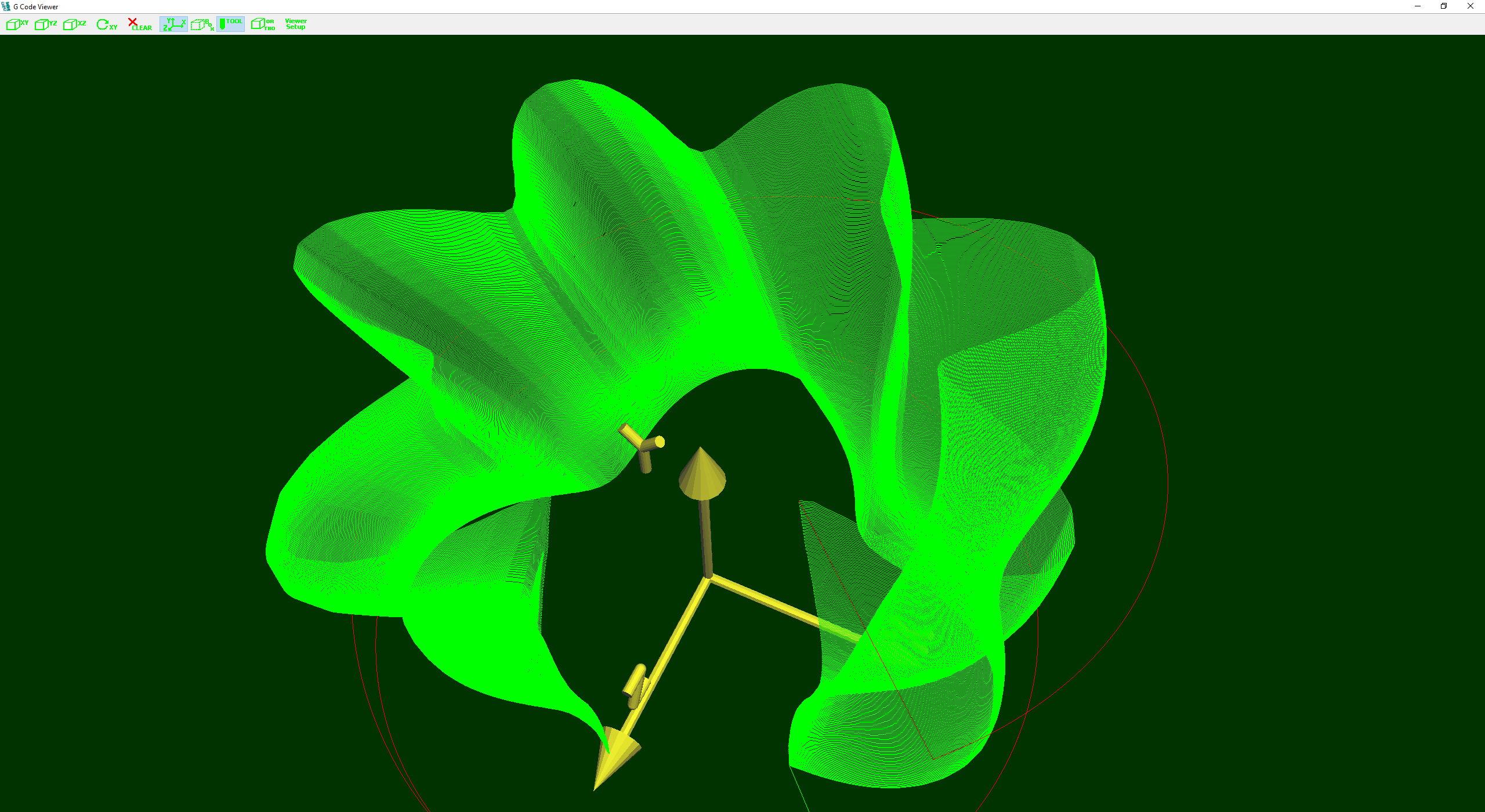
Attached is a plot of your new "wavy" GCode.  It seems to be commanding B only about 310 degrees rather than all the way around 360 degrees.

The issue with 4+ axes GCode is that although the GCode might define how to move all the axes to create the part, it is difficult/impossible for the Trajectory Planer to know how fast to move the axes in order to be cutting at the specified feedrate.  Where the cutting tool is with regard to the axes of rotation and the direction of the motion relative to the XYZ axes motion  and so forth becomes very complicated.  All the Kinematics of the system needs to be considered to do it properly.  Without that the Trajectory Planner has on idea what the cutting feedrate will be when any angular axis is moved.

The Degrees+Radius mode is simple workaround that way works ok in some cases.  It tells the Trajectory Planner to assume that the cutting tool will be at the specified radius from the axis of rotation.  This makes it simple for the TP to know how fast to rotate the axis to move the cutting tool at a desired speed.  It also makes the assumption that any angular motion will be in a direction perpendicular to any other motions caused by the other axes.  So for example in your case if the B Axis causes 1 inch of motion and the Y axis also causes 1 inch of motion, and the desired feedrate is 1000ipm then the B Axis and Y Axis should both be moved at 707ipm to achieve this.

G93 is a completely different approach.  It pushes all the work up to the CAD/CAM system to consider all the Kinematics itself and determine exactly how much time each line of GCode motion should take to execute to achieve the proper cutting rate.  Because each line of GCode is likely to move the cutting tool different distances it is unlikely that it would make sense for two GCode motions to be executed in the same amount of time.  So each line expects and requires a time (inverse feedrate) value.

HTH

Regards

TK


On 7/10/2017 7:28 PM, 'Jack' jackgiz@... [DynoMotion] wrote:
 

Hi Tom,

Thanks for looking into to this for me.  I’ve changed the PostP to specify the B axis instead of A.  I also changed the Z zero from the center of rotation to the perimeter of the cylinder.  I would certainly be interested in the patch for the viewer.


The example of the fluted cylinder was step one to prove out that I could generate a PostP for wrapping and to learn how to do wrapping in Aspire.  However, longer term I am interested in doing shaped forms.  I’ve attached a picture and Gcode of an example.  Will something like this be possible? 


If I select the degrees check box in the B axis motion parameters what radius do I enter?  Why is a radius required if I enter a number for Cnts/deg?


When I run the simulation I get an error “F word missing with inverse time g1 move”.  It doesn’t seem to matter if the G93 command is in the code or not.  Does each line of code require a speed command also?


Jack


From: DynoMotion@yahoogroups.com [mailto:DynoMotion@yahoogroups.com]
Sent: Monday, July 10, 2017 4:27 PM
To: DynoMotion@yahoogroups.com
Subject: Re: [DynoMotion] 4th Axis Post Processor


Hi Jack,

I was looking at the original code and:

#1 Scaled the X axis to be degrees

#2 Global replace of X -> B

#3 Subtracted 3 inches from Z (to be relative to 6 inch diameter)

Then I configured the KMotion CNC B Axis as Degrees Radius=3.0

I think the B Axis angle should be used for rotation around the Y axis.

But that showed up a bug in GCode Viewer with regard to big Angle Changes (normally for short GCode vectors a straight line worked ok, but it doesn't for big B angles)

Here is a GViewer Simulation after fixing the bug:

https://youtu.be/fr4csTrJvL0

I can provide you a patch if you are interested.

Let us know how it works out.

Regards

TK


On 7/9/2017 3:36 PM, 'Jack' jackgiz@... [DynoMotion] wrote:


Hi Tom,

Forget the previous email.  I figured out how to modify the Mach3 Wrapped PostP to work with KmtionCNC.  I’m now getting an A axis and angular movement.  It appears I have solved the theoretical side of the problem, now to see if it translates to the practical side.


Attached is a copy of the GCode for the side fluted cylinder I sent earlier but after using the updated PostP.


Jack


From: DynoMotion@yahoogroups.com [mailto:DynoMotion@yahoogroups.com]
Sent: Saturday, July 08, 2017 12:53 AM
To: DynoMotion@yahoogroups.com
Subject: Re: [DynoMotion] 4th Axis Post Processor


Hi Jack,

Are you using Mach3 or KMotionCNC?

What are you trying to accomplish?

How does your system work?  Could you command multiple revolutions?   ie A0 to A3600 to do 10 revolutions of 360 degrees?

KMotionCNC doesn't support any "wrapping" in the sense that A359 to A1 would just be a +2 degree move.

Regards

TK


On 7/7/2017 9:04 PM, jackgiz@... [DynoMotion] wrote:


Tom,

I'm building a 4th axis for my CNC machine and will be generating the \G code files in Aspire.  The tutorials say to use a post processor for your machine that has the word "wrap" in the title.  For example:


Mach 2/3-WrapYtoA ATC (inch).


 Here are the only PP in the Aspire list for EMC2:


EMC2-G61 arcs(inch)

EMC2-G64 arcs (inch) neither of which seem to have anything to do with a 4th axis

and 

EMC2-arcs(inch) which is the one I normally use.


Any suggestions?


Jack


  @@attachment@@
Group: DynoMotion Message: 14922 From: Jack Date: 7/11/2017
Subject: Re: 4th Axis Post Processor [1 Attachment]
Attachments :

    Tom,

    I got an error when I tried to run the patch.  I renamed the original KmotionCNC and copied this program into the release folder of Kmotion433.  Here’s what I get:


    The GCodeInterpreter.dll is in the same folder.


    Jack


    From: DynoMotion@yahoogroups.com [mailto:DynoMotion@yahoogroups.com]
    Sent: Tuesday, July 11, 2017 12:48 PM
    To: DynoMotion@yahoogroups.com
    Subject: Re: [DynoMotion] 4th Axis Post Processor [1 Attachment]


    [Attachment(s) from Tom Kerekes included below]

    Hi Jack,

    Here is the patch for the Gcode Viewer:

    http://dynomotion.com/Software/Patch/FixBaxisGViewerRadiusPlot_V434i/KMotionCNC.exe

    Although for your new example that consists of small B Axis Angle changes it isn't really needed.  The fluted cylinder example was somewhat unusual in that it had the large B changes of 60 degrees and larger.

    Attached is a plot of your new "wavy" GCode.  It seems to be commanding B only about 310 degrees rather than all the way around 360 degrees.

    The issue with 4+ axes GCode is that although the GCode might define how to move all the axes to create the part, it is difficult/impossible for the Trajectory Planer to know how fast to move the axes in order to be cutting at the specified feedrate.  Where the cutting tool is with regard to the axes of rotation and the direction of the motion relative to the XYZ axes motion  and so forth becomes very complicated.  All the Kinematics of the system needs to be considered to do it properly.  Without that the Trajectory Planner has on idea what the cutting feedrate will be when any angular axis is moved.

    The Degrees+Radius mode is simple workaround that way works ok in some cases.  It tells the Trajectory Planner to assume that the cutting tool will be at the specified radius from the axis of rotation.  This makes it simple for the TP to know how fast to rotate the axis to move the cutting tool at a desired speed.  It also makes the assumption that any angular motion will be in a direction perpendicular to any other motions caused by the other axes.  So for example in your case if the B Axis causes 1 inch of motion and the Y axis also causes 1 inch of motion, and the desired feedrate is 1000ipm then the B Axis and Y Axis should both be moved at 707ipm to achieve this.

    G93 is a completely different approach.  It pushes all the work up to the CAD/CAM system to consider all the Kinematics itself and determine exactly how much time each line of GCode motion should take to execute to achieve the proper cutting rate.  Because each line of GCode is likely to move the cutting tool different distances it is unlikely that it would make sense for two GCode motions to be executed in the same amount of time.  So each line expects and requires a time (inverse feedrate) value.

    HTH

    Regards

    TK


    On 7/10/2017 7:28 PM, 'Jack' jackgiz@... [DynoMotion] wrote:


    Hi Tom,

    Thanks for looking into to this for me.  I’ve changed the PostP to specify the B axis instead of A.  I also changed the Z zero from the center of rotation to the perimeter of the cylinder.  I would certainly be interested in the patch for the viewer.


    The example of the fluted cylinder was step one to prove out that I could generate a PostP for wrapping and to learn how to do wrapping in Aspire.  However, longer term I am interested in doing shaped forms.  I’ve attached a picture and Gcode of an example.  Will something like this be possible? 


    If I select the degrees check box in the B axis motion parameters what radius do I enter?  Why is a radius required if I enter a number for Cnts/deg?


    When I run the simulation I get an error “F word missing with inverse time g1 move”.  It doesn’t seem to matter if the G93 command is in the code or not.  Does each line of code require a speed command also?


    Jack


    From: DynoMotion@yahoogroups.com [mailto:DynoMotion@yahoogroups.com]
    Sent: Monday, July 10, 2017 4:27 PM
    To: DynoMotion@yahoogroups.com
    Subject: Re: [DynoMotion] 4th Axis Post Processor


    Hi Jack,

    I was looking at the original code and:

    #1 Scaled the X axis to be degrees

    #2 Global replace of X -> B

    #3 Subtracted 3 inches from Z (to be relative to 6 inch diameter)

    Then I configured the KMotion CNC B Axis as Degrees Radius=3.0

    I think the B Axis angle should be used for rotation around the Y axis.

    But that showed up a bug in GCode Viewer with regard to big Angle Changes (normally for short GCode vectors a straight line worked ok, but it doesn't for big B angles)

    Here is a GViewer Simulation after fixing the bug:

    https://youtu.be/fr4csTrJvL0

    I can provide you a patch if you are interested.

    Let us know how it works out.

    Regards

    TK


    On 7/9/2017 3:36 PM, 'Jack' jackgiz@... [DynoMotion] wrote:


    Hi Tom,

    Forget the previous email.  I figured out how to modify the Mach3 Wrapped PostP to work with KmtionCNC.  I’m now getting an A axis and angular movement.  It appears I have solved the theoretical side of the problem, now to see if it translates to the practical side.


    Attached is a copy of the GCode for the side fluted cylinder I sent earlier but after using the updated PostP.


    Jack


    From: DynoMotion@yahoogroups.com [mailto:DynoMotion@yahoogroups.com]
    Sent: Saturday, July 08, 2017 12:53 AM
    To: DynoMotion@yahoogroups.com
    Subject: Re: [DynoMotion] 4th Axis Post Processor


    Hi Jack,

    Are you using Mach3 or KMotionCNC?

    What are you trying to accomplish?

    How does your system work?  Could you command multiple revolutions?   ie A0 to A3600 to do 10 revolutions of 360 degrees?

    KMotionCNC doesn't support any "wrapping" in the sense that A359 to A1 would just be a +2 degree move.

    Regards

    TK


    On 7/7/2017 9:04 PM, jackgiz@... [DynoMotion] wrote:


    Tom,

    I'm building a 4th axis for my CNC machine and will be generating the \G code files in Aspire.  The tutorials say to use a post processor for your machine that has the word "wrap" in the title.  For example:


    Mach 2/3-WrapYtoA ATC (inch).


     Here are the only PP in the Aspire list for EMC2:


    EMC2-G61 arcs(inch)

    EMC2-G64 arcs (inch) neither of which seem to have anything to do with a 4th axis

    and 

    EMC2-arcs(inch) which is the one I normally use.


    Any suggestions?


    Jack


    Group: DynoMotion Message: 14923 From: Tom Kerekes Date: 7/11/2017
    Subject: Re: 4th Axis Post Processor

    Hi Jack,

    That patched KMotionCNC.exe is only compatible with Version 4.34i

    Regards

    TK


    On 7/11/2017 7:04 PM, 'Jack' jackgiz@... [DynoMotion] wrote:
     

    Tom,

    I got an error when I tried to run the patch.  I renamed the original KmotionCNC and copied this program into the release folder of Kmotion433.  Here’s what I get:


    The GCodeInterpreter.dll is in the same folder.


    Jack


    From: DynoMotion@yahoogroups.com [mailto:DynoMotion@yahoogroups.com]
    Sent: Tuesday, July 11, 2017 12:48 PM
    To: DynoMotion@yahoogroups.com
    Subject: Re: [DynoMotion] 4th Axis Post Processor [1 Attachment]


    [Attachment(s) from Tom Kerekes included below]

    Hi Jack,

    Here is the patch for the Gcode Viewer:

    http://dynomotion.com/Software/Patch/FixBaxisGViewerRadiusPlot_V434i/KMotionCNC.exe

    Although for your new example that consists of small B Axis Angle changes it isn't really needed.  The fluted cylinder example was somewhat unusual in that it had the large B changes of 60 degrees and larger.

    Attached is a plot of your new "wavy" GCode.  It seems to be commanding B only about 310 degrees rather than all the way around 360 degrees.

    The issue with 4+ axes GCode is that although the GCode might define how to move all the axes to create the part, it is difficult/impossible for the Trajectory Planer to know how fast to move the axes in order to be cutting at the specified feedrate.  Where the cutting tool is with regard to the axes of rotation and the direction of the motion relative to the XYZ axes motion  and so forth becomes very complicated.  All the Kinematics of the system needs to be considered to do it properly.  Without that the Trajectory Planner has on idea what the cutting feedrate will be when any angular axis is moved.

    The Degrees+Radius mode is simple workaround that way works ok in some cases.  It tells the Trajectory Planner to assume that the cutting tool will be at the specified radius from the axis of rotation.  This makes it simple for the TP to know how fast to rotate the axis to move the cutting tool at a desired speed.  It also makes the assumption that any angular motion will be in a direction perpendicular to any other motions caused by the other axes.  So for example in your case if the B Axis causes 1 inch of motion and the Y axis also causes 1 inch of motion, and the desired feedrate is 1000ipm then the B Axis and Y Axis should both be moved at 707ipm to achieve this.

    G93 is a completely different approach.  It pushes all the work up to the CAD/CAM system to consider all the Kinematics itself and determine exactly how much time each line of GCode motion should take to execute to achieve the proper cutting rate.  Because each line of GCode is likely to move the cutting tool different distances it is unlikely that it would make sense for two GCode motions to be executed in the same amount of time.  So each line expects and requires a time (inverse feedrate) value.

    HTH

    Regards

    TK


    On 7/10/2017 7:28 PM, 'Jack' jackgiz@... [DynoMotion] wrote:


    Hi Tom,

    Thanks for looking into to this for me.  I’ve changed the PostP to specify the B axis instead of A.  I also changed the Z zero from the center of rotation to the perimeter of the cylinder.  I would certainly be interested in the patch for the viewer.


    The example of the fluted cylinder was step one to prove out that I could generate a PostP for wrapping and to learn how to do wrapping in Aspire.  However, longer term I am interested in doing shaped forms.  I’ve attached a picture and Gcode of an example.  Will something like this be possible? 


    If I select the degrees check box in the B axis motion parameters what radius do I enter?  Why is a radius required if I enter a number for Cnts/deg?


    When I run the simulation I get an error “F word missing with inverse time g1 move”.  It doesn’t seem to matter if the G93 command is in the code or not.  Does each line of code require a speed command also?


    Jack


    From: DynoMotion@yahoogroups.com [mailto:DynoMotion@yahoogroups.com]
    Sent: Monday, July 10, 2017 4:27 PM
    To: DynoMotion@yahoogroups.com
    Subject: Re: [DynoMotion] 4th Axis Post Processor


    Hi Jack,

    I was looking at the original code and:

    #1 Scaled the X axis to be degrees

    #2 Global replace of X -> B

    #3 Subtracted 3 inches from Z (to be relative to 6 inch diameter)

    Then I configured the KMotion CNC B Axis as Degrees Radius=3.0

    I think the B Axis angle should be used for rotation around the Y axis.

    But that showed up a bug in GCode Viewer with regard to big Angle Changes (normally for short GCode vectors a straight line worked ok, but it doesn't for big B angles)

    Here is a GViewer Simulation after fixing the bug:

    https://youtu.be/fr4csTrJvL0

    I can provide you a patch if you are interested.

    Let us know how it works out.

    Regards

    TK


    On 7/9/2017 3:36 PM, 'Jack' jackgiz@... [DynoMotion] wrote:


    Hi Tom,

    Forget the previous email.  I figured out how to modify the Mach3 Wrapped PostP to work with KmtionCNC.  I’m now getting an A axis and angular movement.  It appears I have solved the theoretical side of the problem, now to see if it translates to the practical side.


    Attached is a copy of the GCode for the side fluted cylinder I sent earlier but after using the updated PostP.


    Jack


    From: DynoMotion@yahoogroups.com [mailto:DynoMotion@yahoogroups.com]
    Sent: Saturday, July 08, 2017 12:53 AM
    To: DynoMotion@yahoogroups.com
    Subject: Re: [DynoMotion] 4th Axis Post Processor


    Hi Jack,

    Are you using Mach3 or KMotionCNC?

    What are you trying to accomplish?

    How does your system work?  Could you command multiple revolutions?   ie A0 to A3600 to do 10 revolutions of 360 degrees?

    KMotionCNC doesn't support any "wrapping" in the sense that A359 to A1 would just be a +2 degree move.

    Regards

    TK


    On 7/7/2017 9:04 PM, jackgiz@... [DynoMotion] wrote:


    Tom,

    I'm building a 4th axis for my CNC machine and will be generating the \G code files in Aspire.  The tutorials say to use a post processor for your machine that has the word "wrap" in the title.  For example:


    Mach 2/3-WrapYtoA ATC (inch).


     Here are the only PP in the Aspire list for EMC2:


    EMC2-G61 arcs(inch)

    EMC2-G64 arcs (inch) neither of which seem to have anything to do with a 4th axis

    and 

    EMC2-arcs(inch) which is the one I normally use.


    Any suggestions?


    Jack


    Group: DynoMotion Message: 14933 From: Jack Date: 7/16/2017
    Subject: Re: 4th Axis Post Processor [1 Attachment]
    Attachments :

      Hi Tom,

      I downloaded 4.34i and got the PostP to give me the same Gcode that you did in the video.  I have a couple of questions about the simulation feature.


                      How do you slow it down so it isn’t over in a flash?


                      Is there a way to zoom in smaller steps per click of the wheel?


      You mentioned that I should be using the B axis if I’m wrapping X around Z.  Why not A?  If I can use A only I could wrap either X or Y and run my 4th axis either parallel to X or Y.  Not sure which way might work better at this point.


      Getting an error message in my Init when I try to define the coordinate system going from my previous Init


      DefineCoordSystem(0,1,3,-1);

      To

      DefineCoordSystem(0,1,3,4,-1);  //ch4 is the new axis


      The error is too many arguments to function.  Suggestions?


      Jack


      From: DynoMotion@yahoogroups.com [mailto:DynoMotion@yahoogroups.com]
      Sent: Wednesday, July 12, 2017 12:07 AM
      To: DynoMotion@yahoogroups.com
      Subject: Re: [DynoMotion] 4th Axis Post Processor [1 Attachment]


      [Attachment(s) from Tom Kerekes included below]

      Hi Jack,

      That patched KMotionCNC.exe is only compatible with Version 4.34i

      Regards

      TK


      On 7/11/2017 7:04 PM, 'Jack' jackgiz@... [DynoMotion] wrote:


      Tom,

      I got an error when I tried to run the patch.  I renamed the original KmotionCNC and copied this program into the release folder of Kmotion433.  Here’s what I get:


      The GCodeInterpreter.dll is in the same folder.


      Jack


      From: DynoMotion@yahoogroups.com [mailto:DynoMotion@yahoogroups.com]
      Sent: Tuesday, July 11, 2017 12:48 PM
      To: DynoMotion@yahoogroups.com
      Subject: Re: [DynoMotion] 4th Axis Post Processor [1 Attachment]


      [Attachment(s) from Tom Kerekes included below]

      Hi Jack,

      Here is the patch for the Gcode Viewer:

      http://dynomotion.com/Software/Patch/FixBaxisGViewerRadiusPlot_V434i/KMotionCNC.exe

      Although for your new example that consists of small B Axis Angle changes it isn't really needed.  The fluted cylinder example was somewhat unusual in that it had the large B changes of 60 degrees and larger.

      Attached is a plot of your new "wavy" GCode.  It seems to be commanding B only about 310 degrees rather than all the way around 360 degrees.

      The issue with 4+ axes GCode is that although the GCode might define how to move all the axes to create the part, it is difficult/impossible for the Trajectory Planer to know how fast to move the axes in order to be cutting at the specified feedrate.  Where the cutting tool is with regard to the axes of rotation and the direction of the motion relative to the XYZ axes motion  and so forth becomes very complicated.  All the Kinematics of the system needs to be considered to do it properly.  Without that the Trajectory Planner has on idea what the cutting feedrate will be when any angular axis is moved.

      The Degrees+Radius mode is simple workaround that way works ok in some cases.  It tells the Trajectory Planner to assume that the cutting tool will be at the specified radius from the axis of rotation.  This makes it simple for the TP to know how fast to rotate the axis to move the cutting tool at a desired speed.  It also makes the assumption that any angular motion will be in a direction perpendicular to any other motions caused by the other axes.  So for example in your case if the B Axis causes 1 inch of motion and the Y axis also causes 1 inch of motion, and the desired feedrate is 1000ipm then the B Axis and Y Axis should both be moved at 707ipm to achieve this.

      G93 is a completely different approach.  It pushes all the work up to the CAD/CAM system to consider all the Kinematics itself and determine exactly how much time each line of GCode motion should take to execute to achieve the proper cutting rate.  Because each line of GCode is likely to move the cutting tool different distances it is unlikely that it would make sense for two GCode motions to be executed in the same amount of time.  So each line expects and requires a time (inverse feedrate) value.

      HTH

      Regards

      TK


      On 7/10/2017 7:28 PM, 'Jack' jackgiz@... [DynoMotion] wrote:


      Hi Tom,

      Thanks for looking into to this for me.  I’ve changed the PostP to specify the B axis instead of A.  I also changed the Z zero from the center of rotation to the perimeter of the cylinder.  I would certainly be interested in the patch for the viewer.


      The example of the fluted cylinder was step one to prove out that I could generate a PostP for wrapping and to learn how to do wrapping in Aspire.  However, longer term I am interested in doing shaped forms.  I’ve attached a picture and Gcode of an example.  Will something like this be possible? 


      If I select the degrees check box in the B axis motion parameters what radius do I enter?  Why is a radius required if I enter a number for Cnts/deg?


      When I run the simulation I get an error “F word missing with inverse time g1 move”.  It doesn’t seem to matter if the G93 command is in the code or not.  Does each line of code require a speed command also?


      Jack


      From: DynoMotion@yahoogroups.com [mailto:DynoMotion@yahoogroups.com]
      Sent: Monday, July 10, 2017 4:27 PM
      To: DynoMotion@yahoogroups.com
      Subject: Re: [DynoMotion] 4th Axis Post Processor


      Hi Jack,

      I was looking at the original code and:

      #1 Scaled the X axis to be degrees

      #2 Global replace of X -> B

      #3 Subtracted 3 inches from Z (to be relative to 6 inch diameter)

      Then I configured the KMotion CNC B Axis as Degrees Radius=3.0

      I think the B Axis angle should be used for rotation around the Y axis.

      But that showed up a bug in GCode Viewer with regard to big Angle Changes (normally for short GCode vectors a straight line worked ok, but it doesn't for big B angles)

      Here is a GViewer Simulation after fixing the bug:

      https://youtu.be/fr4csTrJvL0

      I can provide you a patch if you are interested.

      Let us know how it works out.

      Regards

      TK


      On 7/9/2017 3:36 PM, 'Jack' jackgiz@... [DynoMotion] wrote:


      Hi Tom,

      Forget the previous email.  I figured out how to modify the Mach3 Wrapped PostP to work with KmtionCNC.  I’m now getting an A axis and angular movement.  It appears I have solved the theoretical side of the problem, now to see if it translates to the practical side.


      Attached is a copy of the GCode for the side fluted cylinder I sent earlier but after using the updated PostP.


      Jack


      From: DynoMotion@yahoogroups.com [mailto:DynoMotion@yahoogroups.com]
      Sent: Saturday, July 08, 2017 12:53 AM
      To: DynoMotion@yahoogroups.com
      Subject: Re: [DynoMotion] 4th Axis Post Processor


      Hi Jack,

      Are you using Mach3 or KMotionCNC?

      What are you trying to accomplish?

      How does your system work?  Could you command multiple revolutions?   ie A0 to A3600 to do 10 revolutions of 360 degrees?

      KMotionCNC doesn't support any "wrapping" in the sense that A359 to A1 would just be a +2 degree move.

      Regards

      TK


      On 7/7/2017 9:04 PM, jackgiz@... [DynoMotion] wrote:


      Tom,

      I'm building a 4th axis for my CNC machine and will be generating the \G code files in Aspire.  The tutorials say to use a post processor for your machine that has the word "wrap" in the title.  For example:


      Mach 2/3-WrapYtoA ATC (inch).


       Here are the only PP in the Aspire list for EMC2:


      EMC2-G61 arcs(inch)

      EMC2-G64 arcs (inch) neither of which seem to have anything to do with a 4th axis

      and 

      EMC2-arcs(inch) which is the one I normally use.


      Any suggestions?


      Jack